
How To Connect A Record Player To Bluetooth Speakers
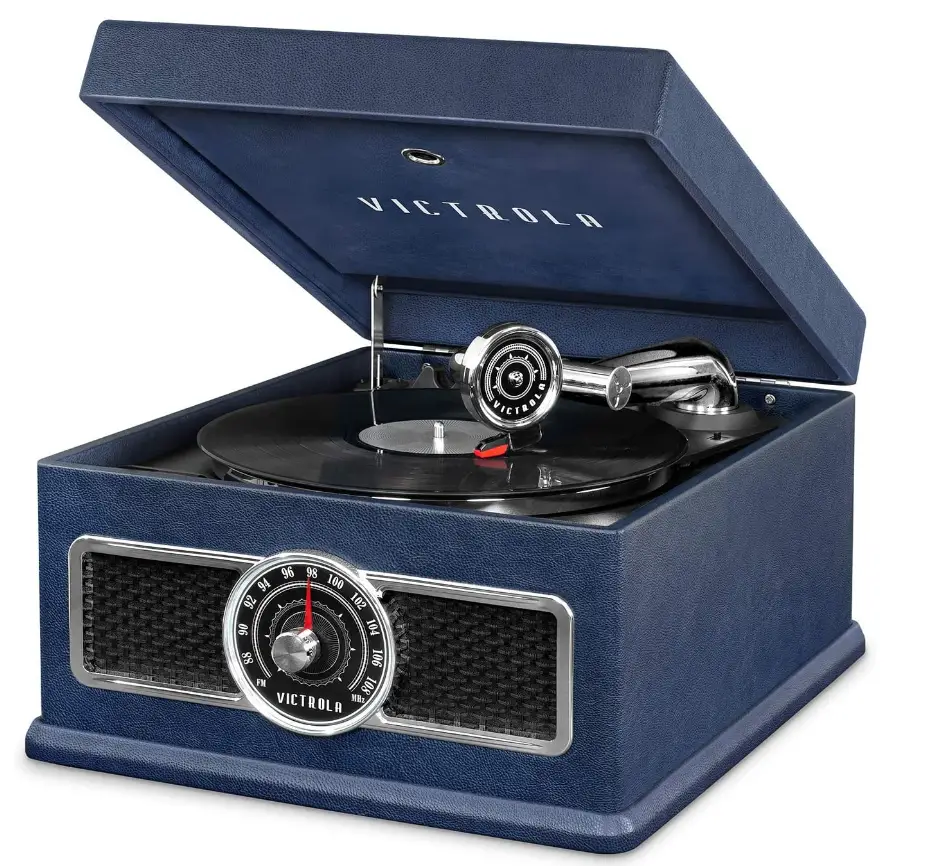
Connecting a record player to Bluetooth speakers allows vinyl enthusiasts to enjoy analog sound with modern wireless convenience. While traditional turntables output audio through wired connections, integrating Bluetooth speakers requires a few additional steps to ensure seamless playback.
This process typically involves using a Bluetooth transmitter or an audio receiver with Bluetooth capabilities to bridge the gap between the turntable’s analog signal and the speaker’s digital input. Proper setup ensures minimal latency and high audio quality, preserving the warm, rich tones vinyl is known for. Whether you're upgrading an existing system or building a new one, understanding the correct connections and equipment is essential for a flawless listening experience.
How to Connect a Record Player to Bluetooth Speakers
Connecting a record player to Bluetooth speakers allows you to enjoy the warm, analog sound of vinyl with the convenience of wireless audio technology.
 Acoustic Audio Speakers How To Connect
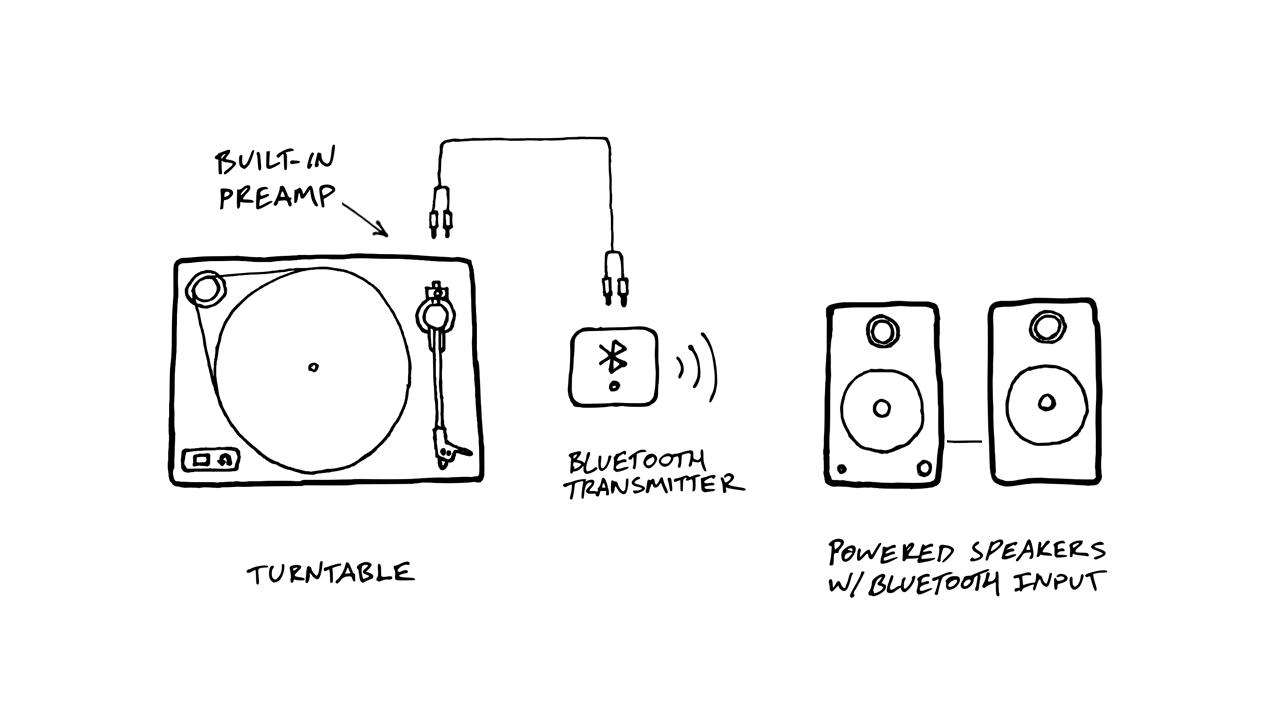
The process typically involves using a turntable with a built-in preamp or pairing an external preamplifier with your setup, as most record players require signal amplification before transmission. Once the audio signal is properly amplified, you can use a Bluetooth transmitter connected to the turntable’s output (such as RCA or headphone jack) to send the signal wirelessly to compatible Bluetooth speakers.
Ensure that both the transmitter and speakers are properly paired and charged, and adjust volume levels on both devices to avoid distortion. This setup preserves the authentic vinyl experience while modernizing playback through wireless convenience.
Understanding Turntable Audio Output and Preamp Requirements
Before connecting a record player to Bluetooth speakers, it's essential to understand the type of audio output your turntable provides and whether it includes a built-in preamp. Turntables produce a low-level signal known as a phono output, which must be amplified to a line-level signal before it can be processed by most audio devices, including Bluetooth transmitters.
Some turntables have a built-in phono preamp with a switch to toggle between phono and line output, while others require an external preamp to boost the signal. Without proper amplification, the sound sent to your Bluetooth speaker will be faint or distorted. To determine your turntable's capabilities, consult the user manual or check for audio output labels such as RCA outputs or a preamp out setting.
 Acoustic Research Wireless Speakers How To Connect
Selecting the Right Bluetooth Transmitter for Your Turntable
To establish a wireless link between your turntable and Bluetooth speakers, you need a compatible Bluetooth audio transmitter. Look for a transmitter with input options that match your turntable's output—commonly 3.5mm AUX, RCA, or ¼-inch jacks.
A high-quality transmitter supports aptX or AAC codecs for better sound fidelity and reduced latency. Ensure the transmitter has low audio delay (measured in milliseconds) to avoid sync issues, especially if using larger speaker systems.
Consider models with rechargeable batteries and a long transmission range (up to 30 meters in open spaces) for reliable performance. Once connected to the turntable via audio cable, the transmitter pairs with your Bluetooth speakers just like any wireless device, enabling seamless vinyl streaming.
Pairing and Optimizing Audio for Wireless Vinyl Playback
After connecting the Bluetooth transmitter to your turntable, the next step is to pair it with your Bluetooth speakers. Place both devices within close proximity, power them on, and activate pairing mode—usually indicated by a flashing LED.
 Altec Lansing Computer Speakers How To Connect
Select the transmitter from the speaker’s Bluetooth menu or vice versa, depending on the configuration. Once paired, play a record and adjust volume controls: start low on the turntable or preamp, then gradually raise the level on the speaker to prevent audio distortion or speaker damage.
For optimal sound quality, minimize wireless interference by keeping other electronic devices away and ensuring a clear line of sight. Keep both the transmitter and speakers fully charged to maintain stable connectivity and consistent audio output during playback.
| Component | Key Feature | Recommended Specification |
|---|---|---|
| Turntable | Output Type | Line-level RCA (with built-in preamp) or Phono with external preamp |
| Bluetooth Transmitter | Input Connection | RCA or 3.5mm AUX compatible with line-level signal |
| Transmitter Audio Codec | Sound Quality | Support for aptX, AAC, or SBC for high-fidelity audio |
| Bluetooth Speaker | Pairing Compatibility | Matches transmitter’s Bluetooth version (5.0 or higher recommended) |
| Power Source | Connection Stability | Rechargeable batteries or constant power supply to avoid dropouts |
How to Connect a Record Player to Bluetooth Speakers: A Step-by-Step Guide
Why can't I pair my turntable with Bluetooth speakers?
Bluetooth Compatibility Issues
- One of the most common reasons you can't pair your turntable with Bluetooth speakers is that not all turntables have built-in Bluetooth transmitters. If your turntable lacks Bluetooth capability, it cannot send a wireless signal to your Bluetooth speakers, making pairing impossible without an external adapter.
- Even if your turntable has Bluetooth, it might only support older or limited Bluetooth profiles that aren't compatible with certain speakers. For example, some turntables support only audio output via Bluetooth but require specific codecs or pairing procedures that your speaker may not recognize.
- Interference from other wireless devices or physical obstructions between the turntable and speaker can also disrupt the Bluetooth handshake process, preventing successful pairing even if both devices are technically compatible.
Incorrect Connection Setup
- Mistakenly attempting to connect the turntable as if it were a Bluetooth source when it’s actually set to receive audio (or vice versa) leads to failed connections. Some turntables are Bluetooth-enabled only for transmitting signal from the turntable, not for receiving audio from devices like smartphones.
- Users may forget to put their turntable or speaker into pairing mode before attempting to connect. Most Bluetooth devices require being manually placed in discoverable mode, which is typically activated through a dedicated button or setting.
- Incorrect signal routing can also be a problem. For example, if your turntable is connected via RCA or AUX to another system such as a receiver or amplifier, the Bluetooth function may be disabled or overridden by the wired configuration, even if it technically supports wireless output.
Power and Firmware Limitations
- Bluetooth functionality in turntables often depends on stable power delivery. If the turntable is underpowered or running on weak batteries (in portable models), the Bluetooth module may fail to initialize or maintain a stable connection.
- Outdated firmware can prevent proper communication between your turntable and Bluetooth speaker. Manufacturers occasionally release firmware updates to fix bugs or improve Bluetooth compatibility, and skipping these updates might result in pairing issues.
- Some entry-level or vintage-style turntables prioritize analog sound quality over digital features and may include only basic or unreliable Bluetooth hardware. These systems are more prone to timeouts, dropped signals, or failure to recognize nearby devices during scanning.
Frequently Asked Questions
Can I connect any record player to Bluetooth speakers?
Yes, most record players can connect to Bluetooth speakers if they have a built-in preamp and a line-out or RCA output. If your turntable lacks Bluetooth, use a Bluetooth transmitter connected to the audio output. Some modern turntables come with built-in Bluetooth for direct pairing. Always check your record player’s specifications and ensure compatibility with wireless speakers for seamless audio streaming.
 Amplifier How To Connect Speakers To TV
What equipment do I need to connect a record player to Bluetooth speakers?
You’ll need a record player with RCA or auxiliary output, a Bluetooth transmitter (if the turntable isn’t Bluetooth-enabled), and Bluetooth speakers. Connect the transmitter to your turntable’s audio output using RCA or 3.5mm cables, power it on, pair it with your Bluetooth speakers, and start playing. Some modern turntables include built-in Bluetooth, eliminating the need for extra hardware.
How do I maintain audio quality when using Bluetooth with a record player?
To preserve audio quality, use a high-quality Bluetooth transmitter that supports aptX or AAC codecs. Keep the distance between devices short and minimize interference from other electronics. Ensure your record player is properly grounded and cleaned. While Bluetooth introduces slight compression, modern codecs deliver near-lossless sound, making the difference barely noticeable on most consumer-grade systems.
Why won’t my Bluetooth speaker connect to my record player?
This issue may occur if your turntable lacks a built-in preamp or Bluetooth transmitter. Ensure you’re using a compatible transmitter connected to the correct output. Check that both devices are in pairing mode and within range. Low batteries, interference, or outdated firmware can also disrupt pairing. Restart both devices, reset the transmitter if needed, and refer to the manuals for troubleshooting steps.
 AmpMe How To Connect Multiple Speakers
Leave a Reply