
How To Connect A Receiver To Speakers

Connecting a receiver to speakers is a crucial step in building a high-quality audio system for your home theater or listening room. Proper setup ensures clear, balanced sound and optimal performance from your equipment.
While the process may seem technical, it involves straightforward steps that anyone can follow with basic guidance. This includes identifying speaker and receiver terminals, matching impedance, using the correct cables, and ensuring secure connections.
Incorrect wiring can lead to poor sound quality or even damage to your devices. Understanding how to correctly pair these components not only enhances audio output but also extends the life of your system.
 Mixer How To Connect A Powered Subwoofer To Passive Speakers
How To Connect A Receiver To Speakers
Connecting a receiver to speakers is a crucial step in setting up a high-quality audio system, whether for a home theater or a stereo setup.
This process involves identifying compatible components, matching impedance and power ratings, and using the correct cables and connection methods. Most receivers feature multiple speaker terminals—usually labeled for front, center, surround, and subwoofer channels—designed to deliver amplified audio signals to each speaker.
Proper wiring ensures balanced sound distribution and prevents damage to both the receiver and the speakers. Following a systematic approach and double-checking polarity and connections are essential to achieve optimal audio performance and system longevity.
Understanding Receiver and Speaker Compatibility
Before connecting your receiver to speakers, it's essential to verify compatibility between the two components.
 Acoustic Audio Speakers How To Connect
Check the receiver's output power (measured in watts per channel) and the speaker's power handling capacity (measured in RMS). A mismatch in power can lead to distortion, clipping, or even permanent damage to the speakers.
Also, pay close attention to impedance ratings, typically 4, 6, or 8 ohms; ensure the receiver supports the speakers’ impedance to avoid overloading the amplifier. Modern AV receivers often include protection circuits, but operating within the recommended specifications ensures the best performance and safest operation.
Choosing the Right Speaker Wire and Connections
The choice of speaker wire impacts both sound quality and system reliability. Use copper-based wire with an appropriate gauge (typically 16 to 12 AWG), depending on the length of the run and speaker impedance: shorter runs may use 16 AWG, while longer distances benefit from thicker 12 or 14 AWG wire to reduce resistance. Stranded wire is more flexible and ideal for home installations.
Make sure to strip about 1/2 inch of insulation from each end and ensure secure connections to both the receiver’s binding posts and the speaker terminals. Maintaining consistent polarity—matching positive (+) and negative (–) terminals—is crucial to preserving proper phase and soundstage accuracy.
 Acoustic Research Wireless Speakers How To Connect
Step-by-Step Guide to Wiring Speakers to a Receiver
Begin by turning off and unplugging the receiver to avoid electrical damage or short circuits. Identify the labeled speaker outputs on the back of the receiver—usually color-coded or marked with labels like Front Left, Center, Surround Right, etc.—and match them to the corresponding speakers.
Loosen the binding posts on the receiver, insert the stripped end of the speaker wire, and tighten securely. Repeat the process at the speaker end.
Once all speakers are connected, double-check that each speaker is assigned correctly in the receiver’s setup menu and perform an audio calibration test using the receiver’s built-in program (like Audyssey or YPAO) to optimize sound levels and delay settings for your room layout.
| Component | Recommended Specification | Key Consideration |
|---|---|---|
| Impedance | 6–8 ohms (most common) | Ensure receiver supports the speaker's impedance range to avoid overheating |
| Speaker Wire Gauge | 16–12 AWG | Use thicker wire (lower gauge) for long cable runs |
| Power Matching | Speaker RMS ≈ Receiver output | Avoid significant mismatches to prevent amplifier strain or speaker damage |
| Polarity | Match (+) and (–) terminals | Incorrect polarity affects soundstage and bass response |
How to Connect a Receiver to Speakers: Step-by-Step Guide
Can you connect any speaker to any receiver, and what are the compatibility requirements?
 Altec Lansing Computer Speakers How To Connect
Yes, you can connect most speakers to most receivers, but compatibility depends on several technical and physical factors. Receivers typically output audio signals through speaker-level outputs, and as long as the speakers can accept those signals and match the impedance and power handling specifications, a connection is feasible.
Passive speakers (which require external amplification) are designed to work with receivers, while active or powered speakers usually have built-in amplifiers and may require line-level inputs, making direct connection to speaker terminals inappropriate.
Understanding specifications such as impedance (measured in ohms), power handling (watts), and sensitivity (dB) ensures a safe and high-performance setup. Additionally, proper wiring practices and matching audio channels (e.g., 5.1 surround sound systems with compatible receivers) are essential for optimal functionality.
Impedance and Power Matching
- Impedance compatibility is critical: most home receivers are designed to operate safely with speakers rated between 4 and 8 ohms. Connecting speakers with an impedance lower than the receiver’s specification can cause overheating and potential damage.
- Power handling must align: speakers should be able to handle the power (in watts) delivered by the receiver. For example, a receiver that outputs 100 watts per channel should be paired with speakers rated to handle at least that amount continuously.
- Under-powering speakers can be as harmful as over-powering them. A low-powered receiver may distort when driven to its limits, potentially damaging the speakers' voice coils.
Speaker Type and Receiver Output Compatibility
- Passive speakers rely entirely on the receiver for amplification and must be connected to the receiver’s speaker-level output terminals using appropriate gauge speaker wire.
- Powered or active speakers require line-level signals (via RCA or 3.5mm inputs) and should not be connected directly to speaker terminals on a receiver, as this could destroy their internal amplifiers.
- Some high-end receivers include preamp outputs (line-level) that can be used with active speakers, but this depends on the receiver’s feature set and proper configuration.
Wiring and Channel Configuration
- Correct channel mapping ensures that front, center, surround, and subwoofer speakers are connected to the corresponding outputs on the receiver, maintaining proper audio imaging and surround sound performance.
- Using proper gauge speaker wire (typically 16–12 AWG) reduces resistance and signal loss, especially over longer distances, and supports higher power applications safely.
- Different connection methods such as banana plugs, spade connectors, or bare wire must match the receiver and speaker terminal types for secure and reliable contact.
How does a receiver send audio signals to speakers in a home theater setup?
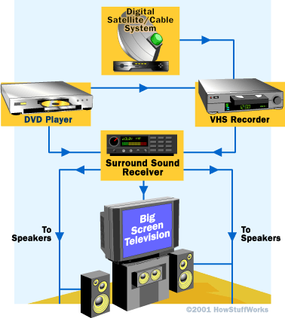
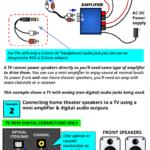 Amplifier How To Connect Speakers To TV
Signal Processing and Amplification
Once the audio source is selected, the receiver begins processing the incoming audio signal from devices such as a Blu-ray player, streaming box, or gaming console. This signal typically arrives via HDMI, optical, or coaxial cables and contains encoded digital audio formats like Dolby Digital, DTS, or more advanced formats such as Dolby Atmos.
The receiver decodes these formats using built-in digital signal processors (DSPs), separating the audio into distinct channels corresponding to the speaker layout (e.g., 5.1, 7.1, or surround sound with height channels).
After decoding, the digital audio signals are converted into analog signals through digital-to-analog converters (DACs). These analog signals are then sent to the receiver’s internal amplifiers, which boost the signal strength to levels capable of driving the connected speakers. The amplification stage is crucial because raw audio signals from source devices are too weak to move speaker drivers effectively.
- The receiver accepts digital audio input from source devices through HDMI, optical, or coaxial connections.
- Internal decoders interpret surround sound formats and assign audio channels based on the speaker configuration.
- Digital-to-analog conversion transforms processed digital signals into analog waveforms suitable for amplification.
Speaker Channel Distribution
After signal processing and amplification, the receiver routes the amplified analog signals to the appropriate speakers based on the surround sound format and physical layout.
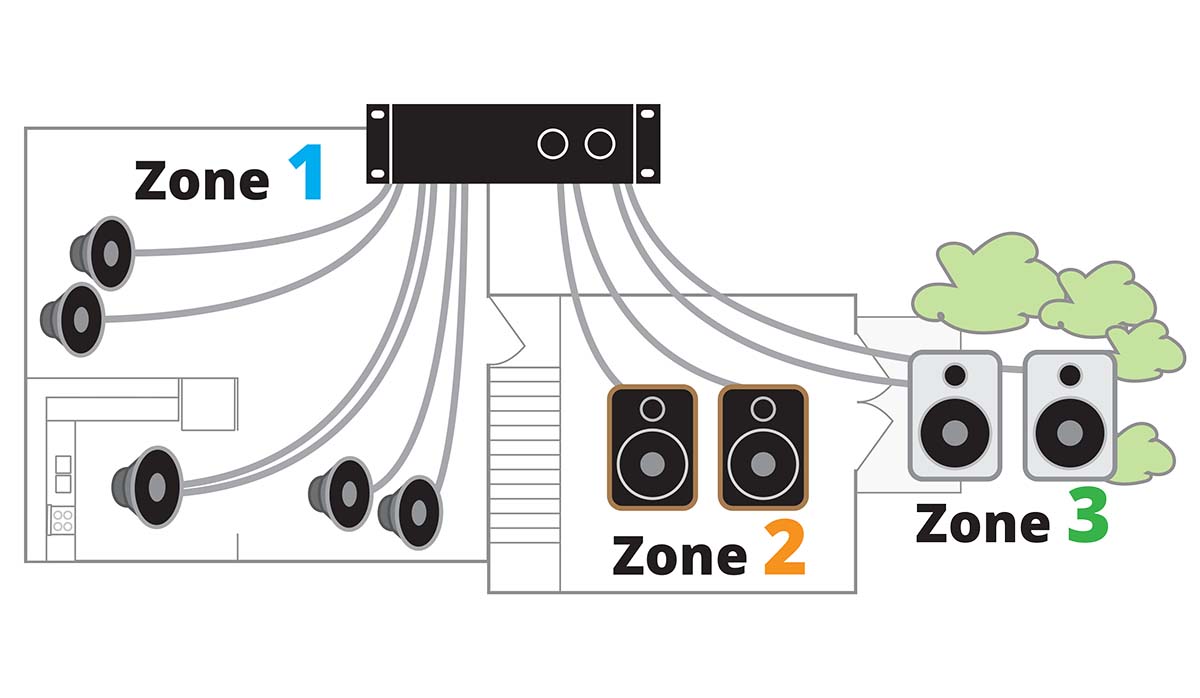
 AmpMe How To Connect Multiple Speakers
Each amplifier channel within the receiver corresponds to a specific speaker—such as front left, front right, center, surround left, surround right, and subwoofer. The receiver ensures that dialogue is directed primarily to the center channel for clarity, while ambient effects and music are distributed across the front and surround speakers to create immersive spatial audio.
In advanced setups with rear surround or ceiling speakers for Dolby Atmos, additional amplifier channels deliver sound to these specific drivers to produce three-dimensional audio effects. Wiring from each amplifier output connects directly to the corresponding speaker terminals, ensuring one-to-one signal delivery for precise audio placement.
- The receiver routes amplified signals to designated speaker outputs based on channel mapping (e.g., front, center, surround).
- Each amplifier channel powers a specific speaker, maintaining audio fidelity and spatial accuracy.
- Advanced receivers support expanded layouts including height and rear channels for object-based audio formats.
Impedance Matching and Power Delivery
To ensure optimal performance and prevent damage, the receiver must match the electrical impedance of the connected speakers, typically rated between 4 and 8 ohms. Impedance mismatch can lead to overheating, distorted sound, or amplifier shutdown.
Modern receivers include protection circuits that monitor load impedance and current draw, automatically adjusting or cutting off output if irregularities are detected. The receiver delivers power based on its rated output per channel, measured in watts (e.g., 100 watts per channel at 8 ohms), which determines how loudly and cleanly the speakers can reproduce sound.
 How To Connect 2 JBL Speakers To One Phone
Sufficient power ensures dynamic range and minimizes distortion during high-volume playback. Additionally, the receiver often includes speaker calibration systems like Audyssey, YPAO, or MCACC, which measure speaker distances, volumes, and room acoustics to balance output across all channels.
- The receiver verifies speaker impedance compatibility to avoid strain on the amplifier circuits.
- Power output is regulated per channel to match speaker requirements and maintain sound clarity.
- Auto-calibration systems analyze room acoustics and adjust timing, volume, and equalization for uniform speaker response.
Frequently Asked Questions
How do I connect a receiver to passive speakers?
Connect passive speakers to a receiver using speaker wire. Strip about ½ inch of insulation from each wire end. Match the positive (+) terminal on the receiver to the positive on the speaker, and the same for negative (−). Insert wires securely into the binding posts or spring clips. Ensure the receiver’s output impedance matches the speaker’s rating (usually 4-8 ohms) for optimal performance and to prevent damage.
What type of cable is needed to connect a receiver to speakers?
Use speaker wire to connect a receiver to passive speakers. Choose copper wire with a gauge between 14 and 16 for most home setups—thicker wire (lower gauge) is better for longer runs. Avoid using audio interconnect cables (like RCA) for this connection, as they are not designed to carry speaker-level signals. Always confirm polarity to maintain proper phase alignment between speakers.
Can I connect multiple speakers to one receiver?
Yes, you can connect multiple speakers to one receiver, but consider impedance and power handling. Use the A/B speaker terminals if available, or a speaker selector switch for more than two pairs. Wiring speakers in parallel lowers impedance, so ensure the total stays within the receiver’s supported range (usually 4–8 ohms). Overloading can cause overheating or damage, so avoid exceeding receiver limits.
Do I need an amplifier if my receiver is connected to speakers?
No, you don’t need a separate amplifier if using a standard AV receiver with passive speakers. The receiver has a built-in amplifier designed to power speakers directly. However, active (powered) speakers typically bypass the receiver’s amp and connect via preamp outputs. Adding an external amplifier is only necessary for high-end setups or when more power is needed than the receiver can provide.
Leave a Reply