
Onkyo Speaker Configuration
Proper speaker configuration is essential to unlocking the full potential of any home audio system, and Onkyo speakers are no exception. Designed to deliver immersive, high-fidelity sound, Onkyo speakers require careful placement, calibration, and setup to achieve optimal performance.
Whether you're configuring a 5.1, 7.1, or Dolby Atmos surround sound system, understanding speaker positioning, channel alignment, and room acoustics plays a crucial role in crafting a cinematic audio experience.
This guide explores the fundamentals of Onkyo speaker configuration, offering practical tips on layout, wiring, and settings to ensure balanced sound distribution. From front speakers to subwoofers, maximize clarity, depth, and realism in every note and dialogue with the right setup.
 What Is Speaker Configuration
Understanding Onkyo Speaker Configuration for Optimal Audio Performance
Configuring your Onkyo speaker system properly is essential to unlocking its full audio potential, whether you're setting up a home theater, stereo system, or multi-room audio environment. Onkyo, known for its high-fidelity audio equipment, offers receivers and speakers designed to work seamlessly together when correctly configured.
The process involves selecting the appropriate speaker size (small, large, or none), setting the correct crossover frequency, assigning speaker levels, and calibrating the system using built-in tools like Audyssey or AccuEQ. Proper configuration ensures balanced sound distribution, accurate dialogue reproduction, immersive surround effects, and protection of speakers from overpowering signals.
Additionally, understanding your room’s acoustics and speaker placement—such as front, center, surround, and subwoofer positions—plays a critical role in achieving a theater-like experience. Onkyo receivers typically feature on-screen setup menus and microphone-assisted auto-calibration to simplify this process, making high-quality sound accessible even for novice users.
Speaker Size and Crossover Settings in Onkyo Systems
Choosing the correct speaker size (large, small, or none) and setting an appropriate crossover frequency are fundamental steps in Onkyo speaker configuration.
 What Speaker Configuration Should I Use For Headphones
When a speaker is set to small, the receiver redirects low-frequency bass signals to the subwoofer, preventing smaller satellites or bookshelf speakers from being overdriven. Conversely, setting a speaker to large allows it to handle full-range audio, which is suitable only for floor-standing speakers capable of reproducing deep bass.
The crossover point—typically between 80 Hz and 120 Hz for most setups—determines the frequency at which the audio signal is split between the main speakers and the subwoofer. Onkyo receivers allow manual crossover adjustment or automatic calibration through Audyssey or AccuEQ, ensuring a seamless blend between speakers and subwoofer for balanced, room-filling sound.
Speaker Level Calibration and Distance Settings
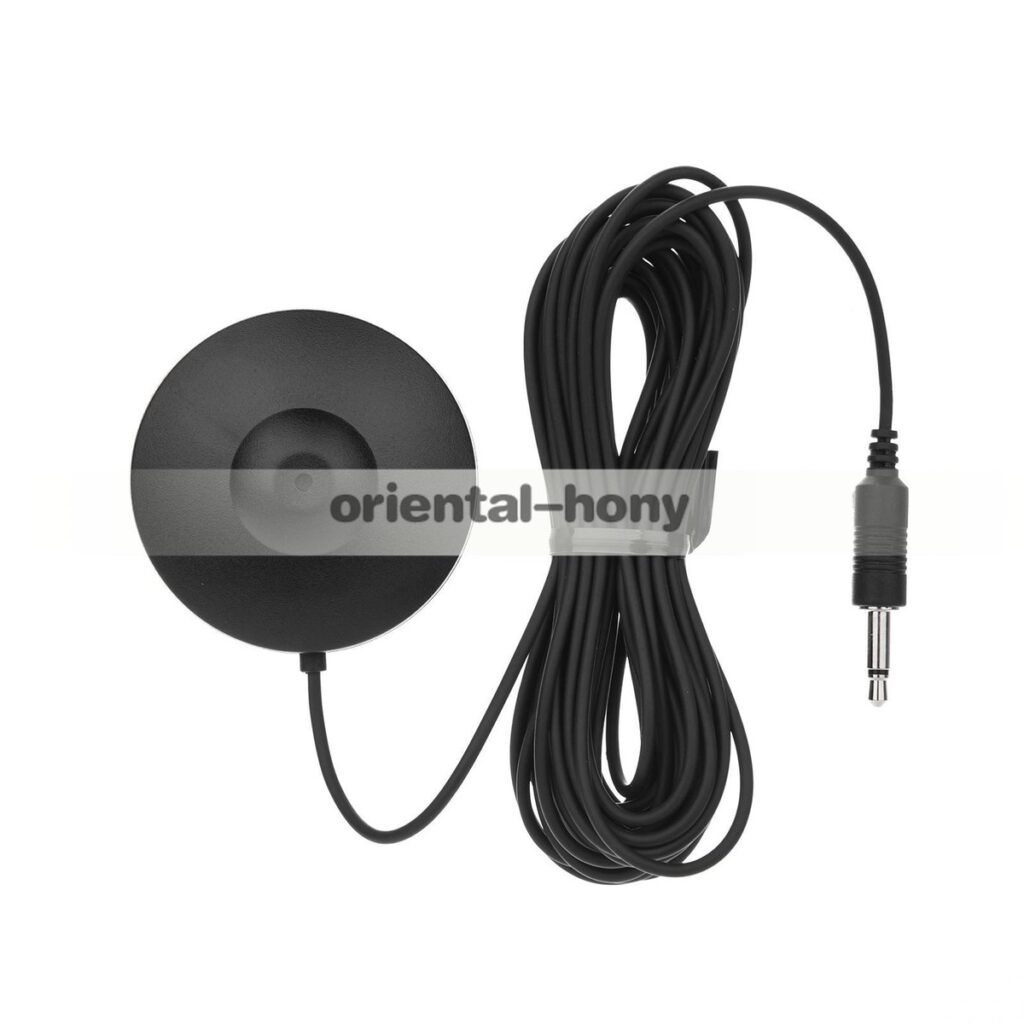
Accurate speaker level calibration and correct distance (delay) settings ensure that sound reaches the listener in perfect synchronization across all channels. Onkyo AV receivers use a calibration microphone to measure the output level and timing of each speaker relative to the main listening position.
Based on these measurements, the receiver adjusts the volume (in dB) and audio delay (in milliseconds) for each speaker so that dialogue, effects, and music arrive cohesively.
 Windows 11 5.1 Speaker Configuration
Manual adjustments may be needed in rooms with unusual acoustics or non-standard seating. Properly calibrated levels prevent overly loud surround effects or a weak center channel, maintaining the director’s intended soundstage. This synchronization is vital for creating a 3D audio experience, especially with formats like Dolby Atmos and DTS:X.
Room Audio Processing Technologies in Onkyo Receivers
Onkyo integrates advanced room correction technologies like AccuEQ, AccuReflex, and support for Audyssey to optimize speaker performance based on room acoustics.
These systems analyze the listening environment using a calibration microphone to detect frequency response imbalances, echo, and speaker distances. AccuEQ automatically detects speaker configuration and sets levels, distances, and crossover frequencies, while AccuReflex enhances height channel performance for Dolby Atmos setups by ensuring phase coherence.
Audyssey MultiEQ, available in select premium Onkyo models, provides more detailed room correction with multi-point measurement and bass management. These technologies help eliminate room nulls and peaks, resulting in smoother frequency response and consistent sound imaging across the listening area.
 Windows 11 Speaker Configuration
| Configuration Setting | Recommended Value | Purpose |
|---|---|---|
| Front Speakers | Small or Large (based on speaker type) | Determines bass handling and crossover use |
| Crossover Frequency | 80 Hz (standard), 60–120 Hz (adjustable) | Routes low frequencies to subwoofer efficiently |
| Center Channel Level | 0 dB (adjust if dialogue is unclear) | Ensures clear vocal reproduction |
| Subwoofer Level | -10 to +10 dB (usually +0 to +6 dB) | Balances bass with main speakers |
| Surround Speaker Distance | Measured from listening position | Ensures synchronized audio arrival |
Onkyo Speaker Configuration: A Comprehensive Setup Guide
What is the best Onkyo speaker setup for optimal audio performance?
The best Onkyo speaker setup for optimal audio performance depends on room size, acoustic properties, and intended usage—whether for immersive home theater, music listening, or mixed media. Onkyo is renowned for producing high-fidelity audio components, especially AV receivers and speaker systems that emphasize accurate sound reproduction and dynamic range.
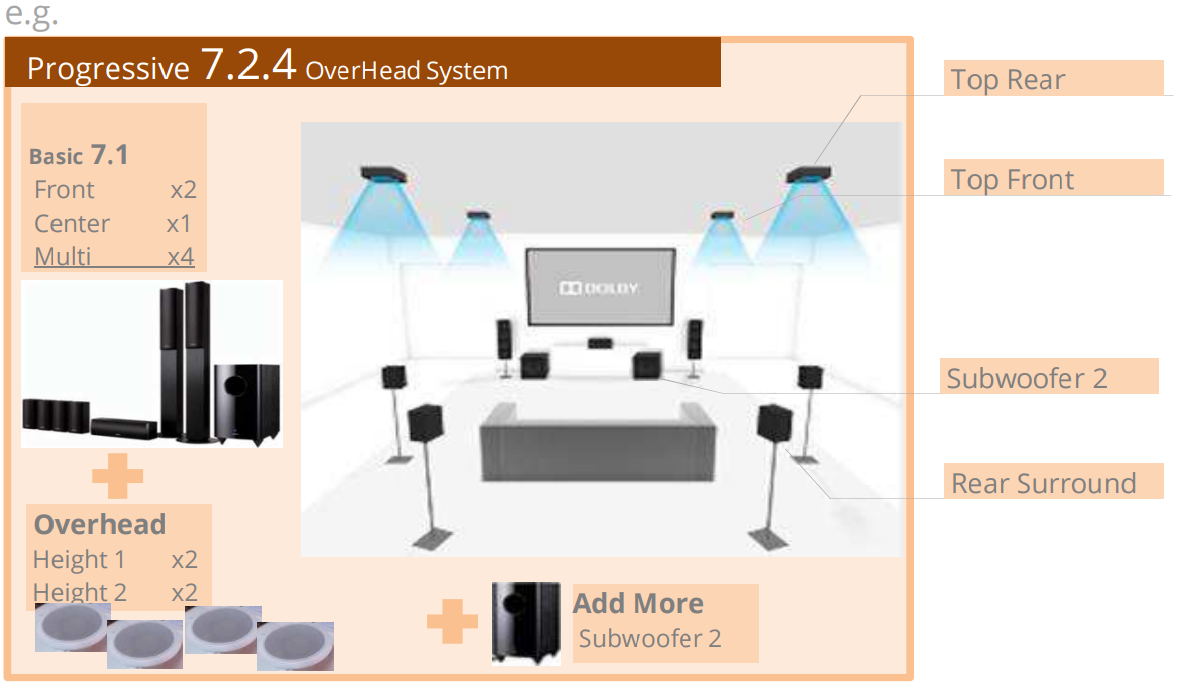
For optimal performance, a 7.1.4 channel configuration using Onkyo’s premium speakers paired with a compatible Onkyo AV receiver, such as the Onkyo TX-RZ1100 or TX-NR7100, is highly recommended. These receivers support advanced audio formats like Dolby Atmos, DTS:X, and Auro-3D, enabling three-dimensional sound. Using vertically oriented speakers or in-ceiling modules for height channels enhances overhead effects, crucial for cinematic realism.
Additionally, ensuring proper speaker placement, room calibration using the receiver’s auto-setup (e.g., AccuEQ), and acoustic treatment further maximize performance. Onkyo’s speaker lines, such as the tallboy models in the SK series or the compact books in the OM series, provide flexibility while maintaining sonic coherence.
 Yamaha Receiver Speaker Configuration
Choosing the Right Onkyo Speaker Configuration for Your Room
- Start by assessing your room's dimensions and layout to decide between a 5.1, 7.1, or Dolby Atmos-enabled setup; larger rooms benefit from 7.1.4 configurations to fill the space with sound evenly.
- Select Onkyo speaker models that match as a timbre-matched set, such as the Onkyo SKS-HT590 or SKS-HT790, ensuring consistent tonal quality across all channels for seamless sound movement.
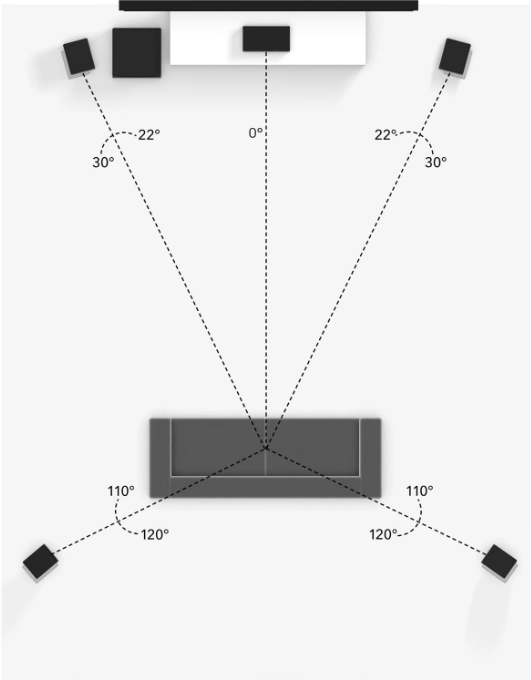
- Position the front left, center, and right speakers at ear level when seated, forming an equilateral triangle with the primary listening position to optimize stereo imaging and dialogue clarity.
Integrating Onkyo Receivers with Advanced Audio Decoding
- Pair your Onkyo speakers with a high-end Onkyo AV receiver like the TX-NR7100, which supports full 4K passthrough, HDMI 2.1, and next-generation audio formats including Dolby Atmos and DTS:X for object-based sound precision.
- Utilize the receiver's onboard calibration system—AccuEQ Advance—to automatically measure speaker distances, adjust volume levels, and correct for room acoustics, ensuring balanced sound distribution across all channels.
- Enable zone 2 or HDMI Zone 2 outputs if extending audio to a second room, allowing the same Onkyo system to serve multiple listening areas without sacrificing main theater fidelity.
Optimizing Surround and Atmos Channels for Immersive Sound
- Place surround speakers slightly behind the main seating area at ear level or slightly above to create a diffuse ambient field, using Onkyo’s bookshelf speakers like the OM series for precise rear effects and music envelopment.
- For Dolby Atmos setups, install Onkyo’s upward-firing or in-ceiling speakers (such as the OFC-1) at the front and rear to reflect or project sound from the ceiling, producing realistic overhead effects like rain, helicopters, or ambient ambiance.
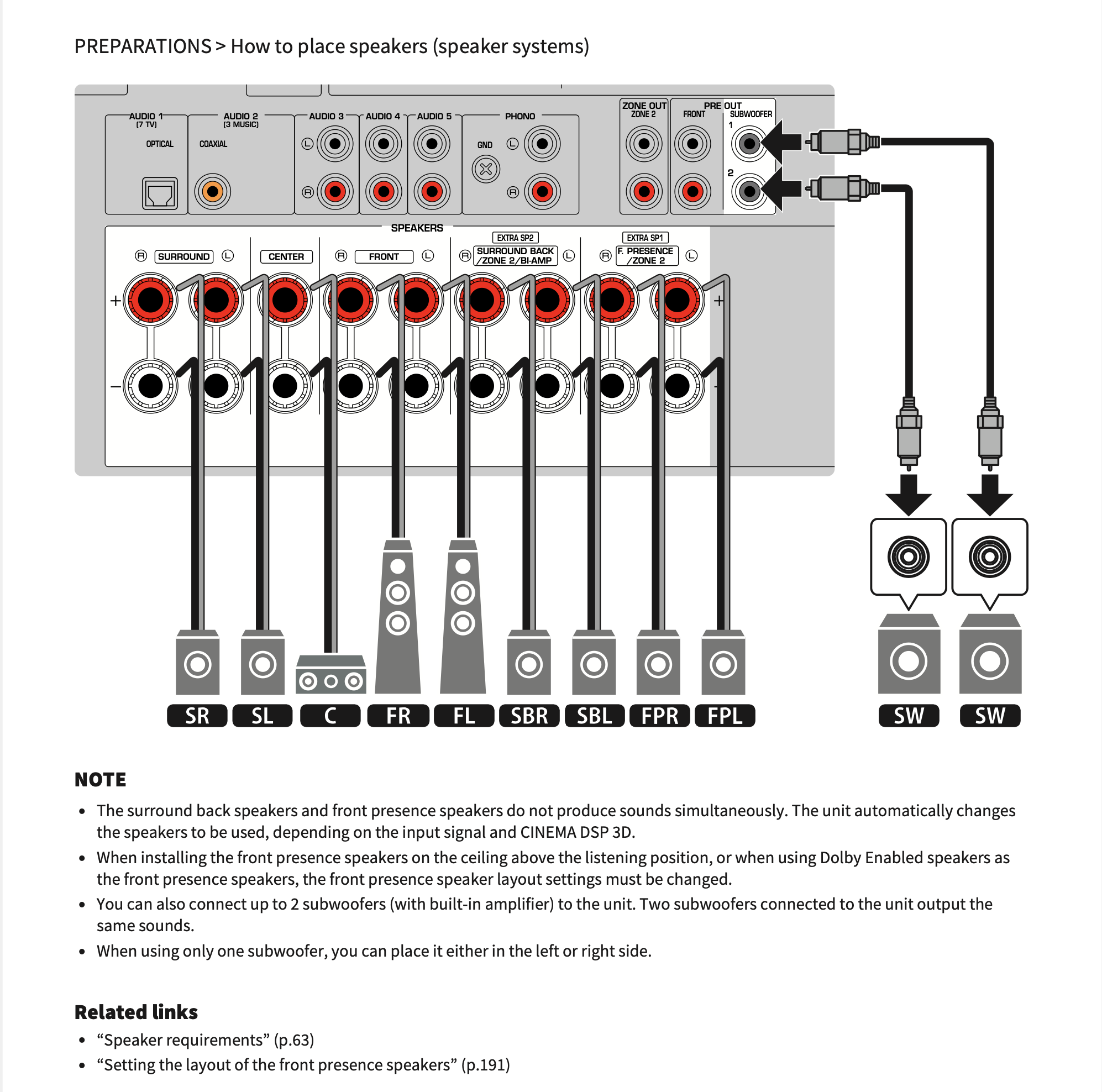
- Ensure all speakers are connected with high-quality speaker wires and properly impedance-matched to the receiver to prevent signal degradation and maximize dynamic range, especially during high-volume or complex audio sequences.
What impact did Onkyo's business closure have on speaker configuration and support?
Discontinuation of Product Lines and Speaker Models
Onkyo's business closure led to the immediate halt of all product manufacturing, including a wide range of speaker systems used in home theater and stereo setups. This discontinuation means consumers can no longer purchase new Onkyo speaker models directly from the company or through authorized channels.
Independent retailers may still have remaining stock, but long-term availability is uncertain. As a result, configuring new speaker systems specifically with Onkyo components has become increasingly difficult, especially for those following legacy Onkyo reference setups.
- The complete stop in production affects matching speaker pairs and surround sound packages, crucial for balanced audio performance.
- Custom installations based on Onkyo’s THX-certified or reference speaker configurations can no longer be replicated using new hardware.
- Replacement of individual speakers within an existing Onkyo setup, such as a center channel or surround unit, has become a challenge due to part scarcity.
Availability of Technical Support and Firmware Updates
With the closure, official technical support services, including online help centers, phone assistance, and email support, were either significantly reduced or eliminated entirely.
 Yamaha Speaker Configuration
This absence impacts users who rely on guidance for proper speaker calibration, impedance matching, or integration with AV receivers. Moreover, firmware updates that once enhanced compatibility with modern devices or corrected audio processing bugs are no longer being developed or released.
- Owners of Onkyo speakers paired with Onkyo AV receivers can no longer access updated firmware that optimized speaker time alignment and room correction.
- Troubleshooting setup issues, such as bi-amping configurations or proper crossover settings, must now rely on archived forums or third-party advice.
- Support documentation, while still accessible in some cases online, is no longer maintained or expanded, increasing reliance on community knowledge.
Impact on Third-Party Integration and Calibration Tools
Onkyo’s closure has also affected ecosystem compatibility, particularly with proprietary calibration systems like MCACC (Multi-Channel Acoustic Calibration System), which was used in Onkyo AV receivers to optimize speaker configuration.
As these receivers are phased out or no longer supported, calibrating Onkyo speakers with precision becomes more complex, especially when integrating into modern home theater systems that rely on standardized software like Audyssey or Dirac.
- Users migrating to different brands’ AV receivers must manually configure speaker settings, losing automated calibration benefits previously provided by Onkyo hardware.
- Cross-brand integration requires greater technical expertise to match Onkyo speakers’ sensitivity and impedance with non-Onkyo equipment.
- Smart home systems and voice-controlled audio platforms lose seamless compatibility without ongoing software support from Onkyo for updated integration protocols.
What is the optimal frequency setting for Onkyo speakers in a surround sound configuration?
Recommended Crossover Frequencies for Onkyo Surround Sound Systems
- The optimal crossover frequency for most Onkyo speaker configurations typically ranges between 80 Hz and 120 Hz, depending on speaker size and room acoustics. This range allows the subwoofer to handle deep bass while the main speakers reproduce mid and high frequencies efficiently.
- For Onkyo systems using compact satellite speakers, setting the crossover around 100–120 Hz ensures that small drivers are not overburdened by low-frequency demands. This provides cleaner dialogue and music reproduction in movies and music content.
- Larger Onkyo floor-standing speakers capable of reproducing deeper bass can be set to a lower crossover point, such as 60–80 Hz, allowing for a more seamless transition between the main channels and subwoofer, especially when the subwoofer is well-integrated into the room.
Using Onkyo's Setup Assistant and Audyssey for Optimal Calibration
- Most modern Onkyo AV receivers include Audyssey MultEQ or Onkyo's own setup assistant, which automatically measures speaker distances, levels, and frequency response to set appropriate crossover points. Running this system ensures that each speaker in the surround setup is optimized for the room.
- Audyssey analyzes the performance of each speaker and recommends crossover frequencies based on their actual bass output capability and room interactions, which is often more accurate than manual settings.
- After auto-calibration, it's advisable to manually verify the settings, especially for the front speakers and subwoofer. Some users choose to adjust the recommended crossover slightly—up or down by 10–20 Hz—based on personal preference or known speaker limitations.
Adjusting Speaker Settings Based on Content Type and Room Layout
- Different types of content, such as movies, music, or gaming, may benefit from tailored frequency settings. For example, action movies with intense bass effects often perform best with a subwoofer crossover set at 80 Hz and satellite speakers directed to small, ensuring the sub handles the LFE (Low-Frequency Effects) channel efficiently.
- Room layout significantly influences optimal frequency settings. Large rooms or rooms with reflective surfaces may require lower crossover points to avoid bass buildup, while smaller, damped rooms can support higher crossover frequencies without muddiness.
- Experimenting with settings using familiar audio tracks or movie scenes helps fine-tune the configuration. Using test tones or bass-heavy scenes, users can adjust each speaker’s crossover in 10 Hz increments until bass appears balanced and localized correctly across the soundstage.
Frequently Asked Questions
How do I set up my Onkyo speakers for optimal surround sound?
Position the front left and right speakers at ear level, forming a 30-degree angle with the main listening position. Place the center channel speaker above or below the TV, facing the listener. Set surround speakers to the sides or slightly behind the listening area. Use the included manual or Onkyo’s setup guide to calibrate speaker distances and levels via the receiver’s auto-setup feature for best audio performance.
Can I connect my Onkyo speakers to a non-Onkyo AV receiver?
Yes, Onkyo speakers can be connected to any compatible AV receiver regardless of brand. Ensure the receiver’s power output matches the speakers’ impedance and wattage ratings to avoid damage. Use high-quality speaker wire and proper polarity when connecting. Most Onkyo speakers have standard binding posts, making them easy to integrate into multi-brand home theater systems while maintaining excellent sound quality and performance.
What is the best way to calibrate Onkyo speakers using the receiver?
Use the built-in auto-calibration system like AccuEQ or Audyssey found in most Onkyo receivers. Connect the included microphone to the receiver and follow on-screen instructions to measure sound from each speaker. The system adjusts volume levels, distances, and equalization for balanced audio. Place the mic at the main listening position and minimize background noise for accurate calibration results across all channels.
Do Onkyo speakers support wireless configuration?
Most Onkyo speakers require wired connections to an AV receiver for true surround sound. However, certain models integrate with wireless subwoofers or support wireless audio via compatible Onkyo receivers with Wi-Fi or Bluetooth. For full surround setups, wires are essential. Use Onkyo’s wireless rear speaker kits where available to reduce cable clutter while maintaining high-quality audio transmission and synchronization.
Leave a Reply