
Yamaha Speaker Configuration

Yamaha speaker configuration plays a crucial role in achieving optimal audio performance for home theater, music, and immersive entertainment systems.
Known for innovation and acoustic excellence, Yamaha offers a diverse range of speakers and amplification technologies designed to suit various room layouts and listening preferences. Proper configuration ensures balanced sound distribution, enhanced clarity, and a true surround experience.
From selecting speaker placement to calibrating levels using Yamaha’s advanced room correction systems like YPAO, each step impacts overall audio quality. Understanding the fundamentals of speaker arrangement, impedance matching, and system integration allows users to maximize the potential of their Yamaha audio setup.
 Realtek Hd Audio Manager Speaker Configuration
Understanding Yamaha Speaker Configuration for Optimal Audio Performance
Yamaha speaker configuration plays a critical role in delivering high-quality sound across home theater systems, stereo setups, and professional audio environments. Proper configuration ensures that each speaker—whether it’s a front left/right, center, surround, or subwoofer—works harmoniously to produce immersive, balanced audio.
Yamaha’s advanced audio technologies, such as YPAO (Yamaha Parametric Room Acoustic Optimization), analyze room acoustics and automatically calibrate speaker size, distance, volume levels, and frequency response to match the environment. This system uses a supplied microphone to detect sound from each speaker and makes precise adjustments for optimal performance.
Manual configurations are also supported, allowing audiophiles to fine-tune settings such as speaker size (small or large), crossover frequency, and channel level by ear or measurement tools. Whether utilizing an AV receiver, soundbar, or studio monitors, correctly configuring Yamaha speakers enhances clarity, spatial accuracy, and overall listening experience across music, movies, and gaming.
Speaker Setup Options in Yamaha AV Receivers
Yamaha AV receivers offer versatile speaker setup configurations, ranging from basic stereo (2.0) to advanced surround sound systems such as 5.1, 7.1, and even immersive formats like Dolby Atmos and DTS:X, which support height channels (e.g., 5.1.2 or 7.1.4).
 Sonos Playbar Speaker Configuration
During the initial setup, users can define the number and type of connected speakers, including front, center, surround, surround back, and height speakers. The receiver’s on-screen menu guides users through wiring verification and configuration, with options to designate each speaker as “Large” or “Small” depending on its bass-handling capability.
Selecting “Small” routes low-frequency sounds to the subwoofer, preventing distortion and ensuring cleaner audio. Yamaha receivers also support A/B speaker switching, bi-amping, and zone configurations, allowing multi-room audio distribution. These setup options make Yamaha receivers adaptable to various room sizes and listening preferences.
YPAO: Yamaha’s Automated Room Calibration Technology
YPAO (Yamaha Parametric Room Acoustic Optimization) is a proprietary auto-calibration system designed to optimize speaker performance based on room acoustics. By using a supplied calibration microphone, YPAO measures the response of each speaker at the listening position, assessing parameters such as distance, level, crossover, and room reflections.
The system then applies digital signal processing to correct for room anomalies like standing waves, echoes, and uneven frequency response. YPAO not only sets individual speaker levels but also adjusts time alignment so that sound from all speakers reaches the listener simultaneously.
 Sonos Speaker Not Configured
Advanced versions, such as YPAO with R.S.C. (Reflected Sound Control) and Multipoint measurement, further enhance accuracy by analyzing multiple seating positions and attenuating unwanted early reflections. This ensures a more natural and theater-like soundstage, particularly beneficial in irregularly shaped rooms or those with problematic acoustic surfaces.
Configuring Speakers in Yamaha Soundbar Systems
Yamaha soundbar systems, such as the YAS-209, YAS-109, and higher-end models like the SR-C30A, offer simplified speaker configuration tailored for easy home integration.
These systems typically include a soundbar and a wireless subwoofer, with select models adding wireless rear speakers to create a true surround experience. Configuration is usually managed through a remote control, mobile app (such as the Yamaha Soundbar Controller), or on-screen display, guiding users through speaker detection and level adjustment.
The built-in YPAO or equivalent calibration ensures the subwoofer blends seamlessly with the soundbar, while virtual surround processing simulates a wide soundfield even without rear speakers. Users can customize EQ settings, dialogue enhancement, and bass/treble levels according to content type—ideal for movies, music, or news. The wireless connectivity simplifies setup and allows flexible placement, making Yamaha soundbars suitable for compact living spaces.
 Speaker Configuration Mono Or Stereo Valorant
| Configuration Type | Typical Speaker Layout | Key Yamaha Feature | Best For |
|---|---|---|---|
| 2.0 / Stereo | Front Left + Front Right | High-resolution audio decoding | Music listening, small rooms |
| 5.1 Surround | Front L/R, Center, Surround L/R, Subwoofer | YPAO calibration | Movies, gaming, general home theater |
| 7.1.2 Dolby Atmos | Front, Center, Surround, Back, Height (up-firing or ceiling) + Sub | DSP modes, 3D sound mapping | Immersive cinema experience |
| Soundbar + Sub (Virtual Surround) | Soundbar, Wireless Subwoofer | Clear Voice, Bass Extension | TV dialog, compact setups |
Yamaha Speaker Configuration Guide: Optimize Your Audio Setup for Best Performance
What is the optimal speaker configuration for Yamaha systems?
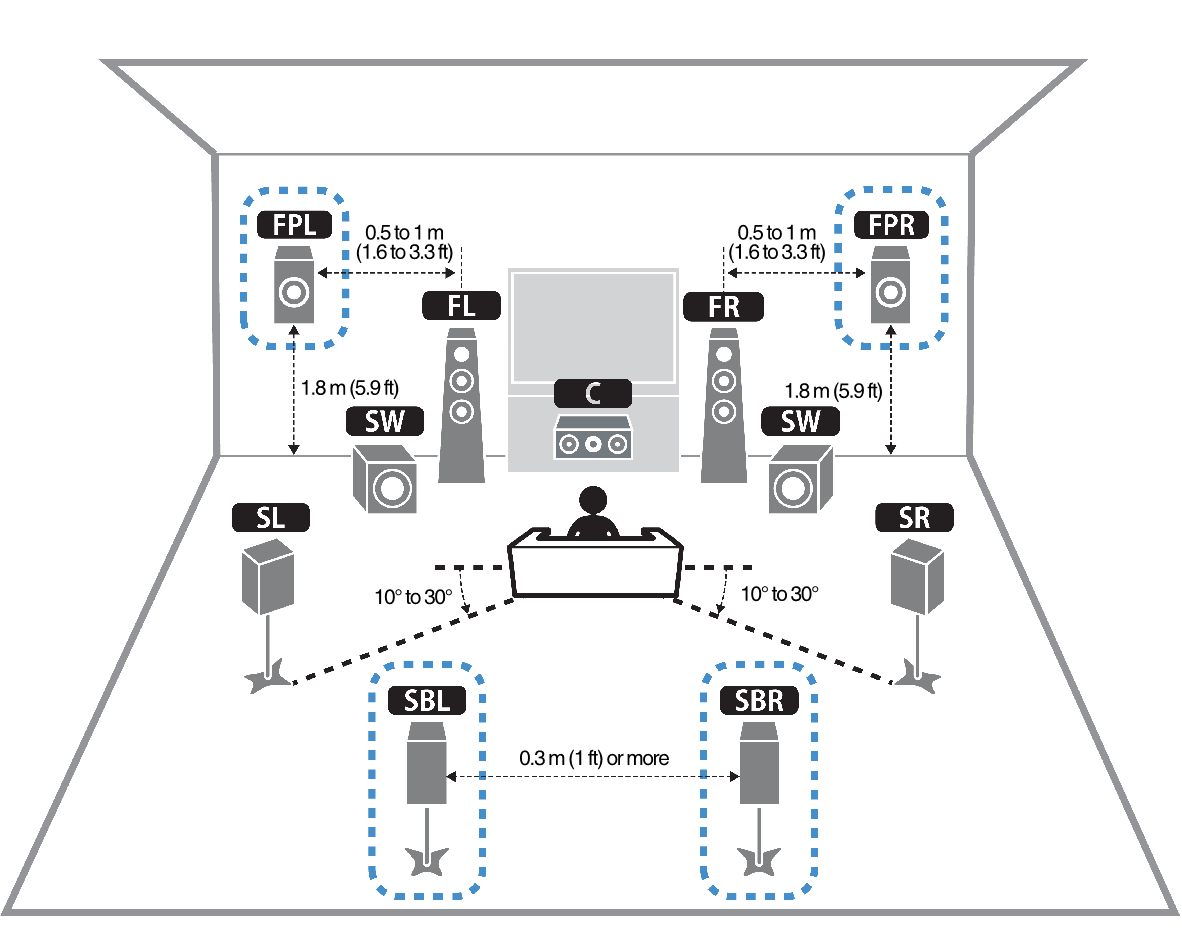
The optimal speaker configuration for Yamaha systems depends on the intended application—whether for home theater, music listening, or professional audio—but generally aligns with industry-standard surround sound formats enhanced by Yamaha’s proprietary technologies such as surround sound processing (e.g., YSP, YPAO, and Cinema DSP).
For most home theater setups, a 5.1 or 7.1 surround sound configuration delivers immersive audio with precise localization and rich ambient effects. Yamaha’s advanced receivers and sound processors are designed to optimize speaker placement and audio distribution, often compensating for room acoustics through YPAO (Yamaha Parametric Room Acoustic Optimizer).
For music enthusiasts, a well-placed stereo pair with compatible bookshelf or floor-standing speakers provides excellent sound staging and fidelity when paired with Yamaha’s high-quality amplification. Additionally, incorporating elevation speakers or using Yamaha’s sound projection technology allows for expanded soundfields without complex wiring.
 Speaker Configuration Windows 10
Recommended Surround Sound Setups for Yamaha AV Receivers
- A 5.1 surround sound configuration is widely regarded as the optimal starting point for Yamaha AV receivers, offering a balanced audio experience with left, center, and right front speakers, dual surround speakers, and a subwoofer for low-frequency effects.
- For larger rooms or more immersive viewing, a 7.1 setup adds two additional surround back speakers, enhancing directional audio cues and enveloping the listener more effectively, especially in content mixed for extended surround formats.
- Yamaha receivers with support for Dolby Atmos and DTS:X are best utilized in a 5.1.2 or 7.1.4 configuration, where height channels (either in-ceiling or upward-firing speakers) create a three-dimensional sound experience, allowing sounds to move overhead for greater realism.
Integration of YPAO for Optimal Speaker Calibration
- Yamaha’s Parametric Room Acoustic Optimizer (YPAO) analyzes the room’s acoustics using a supplied microphone to measure speaker output, automatically adjusting volume levels, equalization, and speaker distances for balanced sound reproduction.
- YPAO Room Reflector Manager and 3D technology further refine audio by calculating how sound reflects off walls and ceilings, particularly beneficial when using elevation or overhead speakers in Atmos setups.
- Proper microphone placement during YPAO calibration—typically at primary listening positions—is crucial to ensure measurements reflect real-world listening conditions, resulting in the most accurate speaker configuration optimization.
Best Practices for Speaker Placement in Yamaha Systems
- Front left and right speakers should be placed at ear level when seated, forming an equilateral triangle with the main listening position to ensure optimal stereo imaging and dialogue clarity from the center channel.
- Surround speakers in a 5.1 or 7.1 setup should be positioned slightly to the sides and slightly behind the listener, ideally between 90 to 120 degrees from the center channel, enhancing ambient effects without revealing discrete speaker locations.
- Subwoofer placement benefits from flexibility due to the non-directional nature of low frequencies; however, positioning it along the front wall, avoiding corners unless bass management is fine-tuned, helps maintain tight and accurate bass response across the listening area.
What are the sound modes available in Yamaha soundbar speaker configurations?
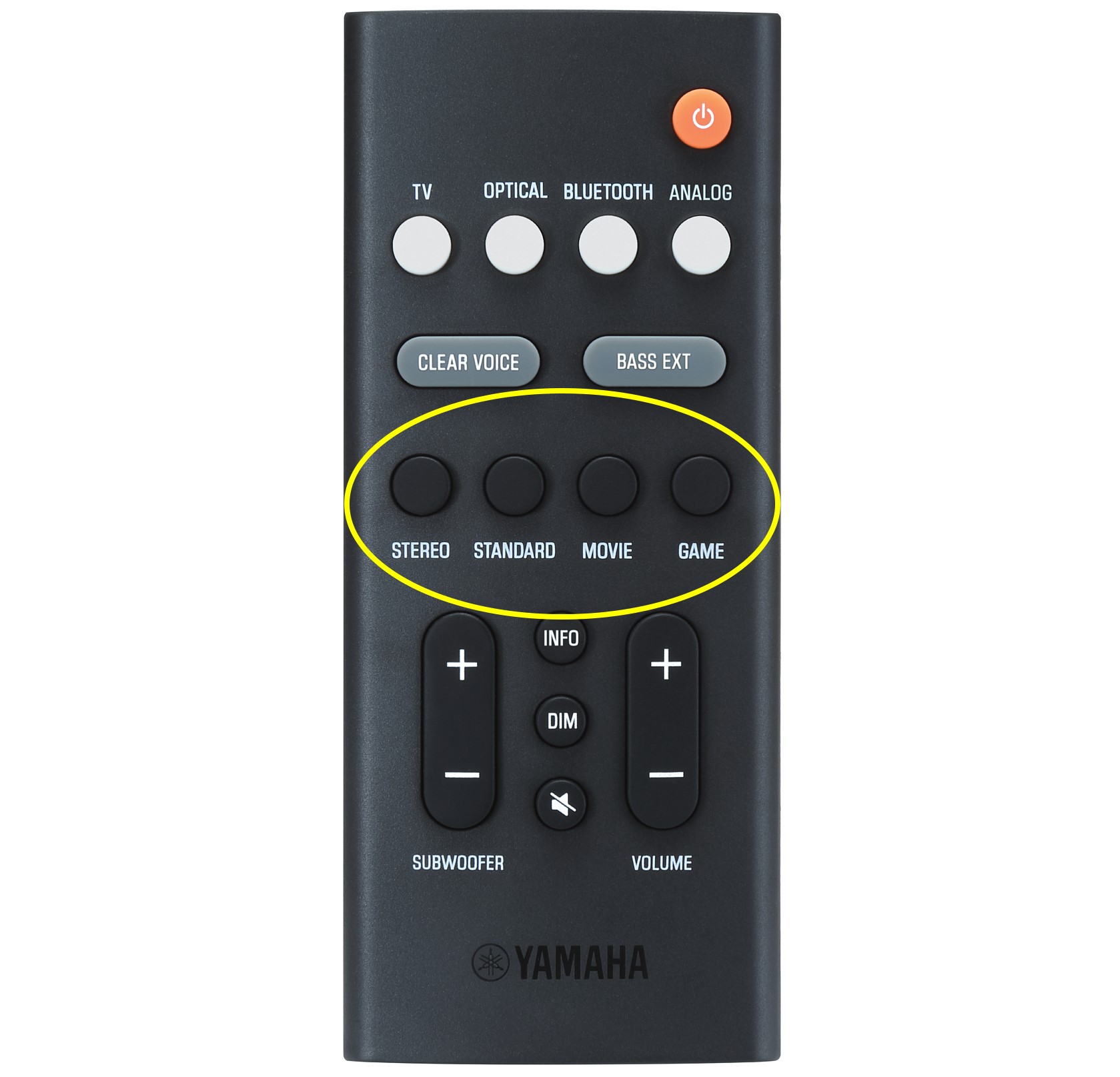
Common Sound Modes in Yamaha Soundbar Configurations
Yamaha soundbars are engineered to deliver immersive audio experiences by offering a variety of sound modes tailored to different content types and listening environments.
These modes adjust equalization, virtual surround processing, and spatial effects to optimize sound performance. Most Yamaha soundbar models include standard modes such as Standard, Movie, Music, and Voice. The Standard mode delivers a balanced audio profile suitable for general use.
Movie mode enhances bass and surround effects to simulate a cinematic experience, making it ideal for films and action-packed series. Music mode emphasizes clarity and instrument separation, perfect for listening to songs or concerts. Voice mode boosts midrange frequencies to improve dialogue intelligibility, which is especially helpful for news broadcasts or talk-heavy content.
 Speaker Configurations
- Standard mode provides a neutral audio signature suitable for everyday listening, maintaining a balanced frequency response across all channels.
- Movie mode utilizes digital signal processing to expand the surround sound field, adding depth and realism to films and TV shows.
- Music mode adjusts stereo imaging and high-frequency response to reproduce vocals and instruments more accurately, enhancing music playback fidelity.
Advanced DSP Modes and Surround Enhancements
Beyond basic sound settings, Yamaha soundbars often incorporate advanced Digital Soundfield Processing (DSP) modes inspired by their renowned AV receivers. These DSP modes simulate various acoustic environments, such as concert halls, stadiums, or jazz clubs, by applying unique reverb and echo profiles to the audio signal.
Some models feature modes like 5 Channel Stereo, Stereo, and Virtual Surround. 5 Channel Stereo distributes audio across all speakers (including virtual rear channels), creating a full surround experience even without physical rear speakers.
Virtual Surround uses psychoacoustic techniques to simulate surround sound from a single front-facing unit. Additionally, Yamaha’s Cinema DSP technology, available in select high-end soundbars, delivers multidimensional soundscapes by mimicking the acoustics of real-world venues.
- Cinema DSP modes replicate the sound characteristics of real acoustic spaces, such as theaters or concert halls, enhancing immersion during movie playback.
- Virtual Surround mode creates a wider soundstage using front-firing drivers and beam technology, giving the impression of sound coming from beyond the soundbar’s physical location.
- 5 Channel Stereo mode processes stereo input and spreads it across left, center, right, and virtual surround channels, simulating a complete 5.1 experience.
Adaptive and Smart Sound Modes
Many newer Yamaha soundbar models integrate adaptive audio technologies that automatically adjust sound output based on content and room acoustics.
 Speaker Configurator
These smart modes include Clear Voice, which dynamically amplifies speech frequencies to ensure dialogue remains clear over background noise. Another example is Adaptive Volume, which maintains consistent loudness levels across different sources or programs, preventing sudden volume spikes during commercials or scene changes.
Some soundbars also support AI-based scene recognition, which detects whether the input is music, movie, or game content and switches to the appropriate sound mode automatically. These intelligent features enhance user convenience and ensure optimal audio performance across diverse listening scenarios.
- Clear Voice mode continuously analyzes audio and boosts human voice frequencies, ideal for ensuring spoken content is always intelligible without manual adjustment.
- Adaptive Volume minimizes abrupt volume changes between programs, media types, or input sources, delivering a smoother and more comfortable listening experience.
- AI Sound Processing in select models recognizes content type in real time and dynamically selects the most appropriate DSP mode to match the audio source.
What is the optimal speaker connection setup for Yamaha configurations?
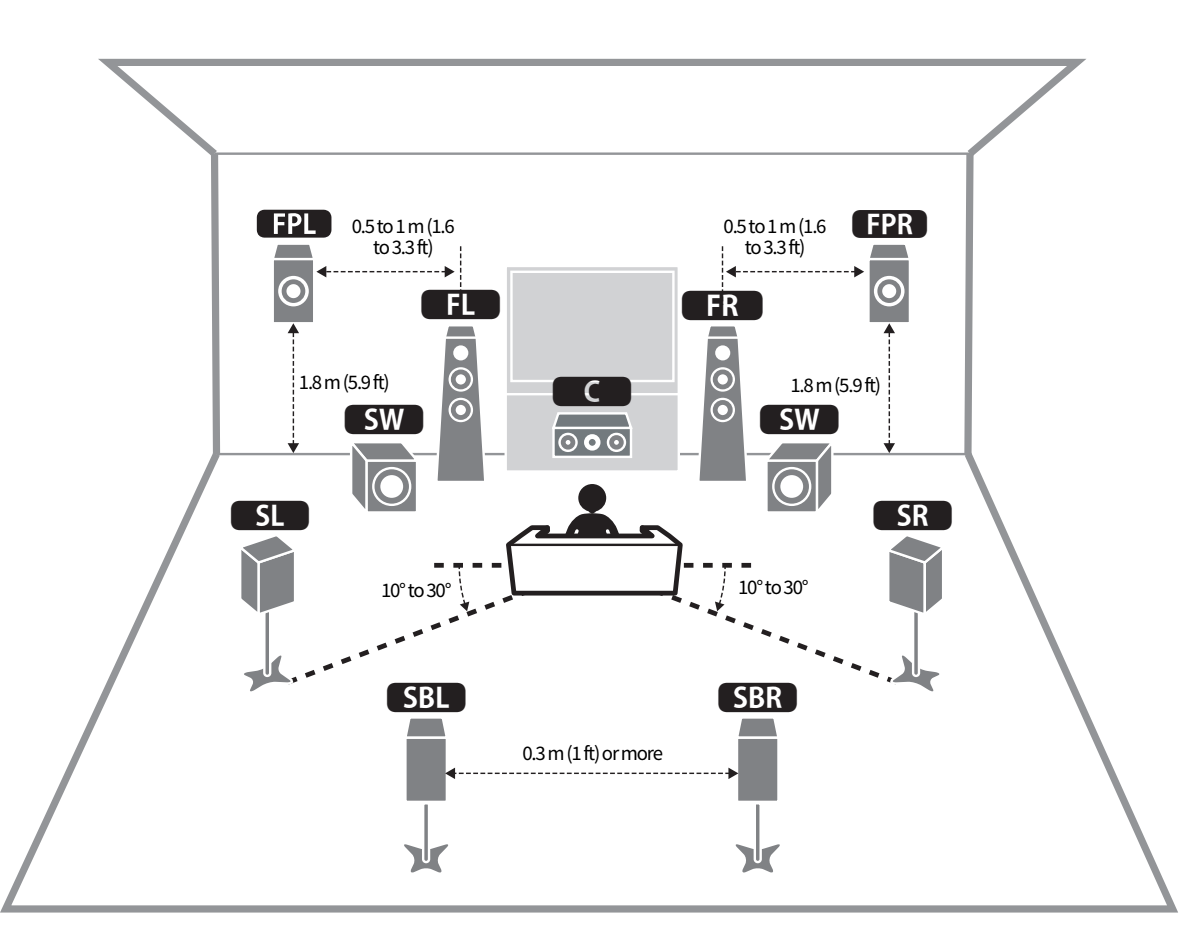
The optimal speaker connection setup for Yamaha configurations depends on the specific model of the AV receiver or amplifier, the number of speakers, and the desired audio experience such as stereo, surround sound, or immersive audio formats like Dolby Atmos.
Yamaha is well known for its high-quality audio equipment and proprietary technologies such as YPAO (Yamaha Parametric Room Acoustic Optimization), which helps fine-tune speaker performance based on room acoustics. To achieve the best audio performance, users should ensure correct impedance matching (typically 6–8 ohms), use high-quality speaker cables, and follow proper wiring practices like maintaining consistent polarity.
Additionally, speakers should be placed according to industry standards—for example, the front left and right speakers forming an equilateral triangle with the main listening position. Yamaha receivers often support multiple speaker configurations including 5.1, 7.1, and even up to 9.2 channels when combined with external amplification, allowing for flexible setups to suit different room sizes and usage preferences.
Recommended Speaker Layout for Yamaha 5.1 and 7.1 Setups
- For a Yamaha 5.1 surround sound configuration, place the front left and right speakers at 30 degrees relative to the primary listening position, ensuring they are equidistant from the listener and form a front soundstage. These speakers should be at ear level when seated.
- The center channel speaker should be positioned directly above or below the display, angled toward the listener, as it handles most dialogue and on-screen audio, making precise placement critical for clarity.
- Surround speakers in a 5.1 layout should be placed to the side or slightly behind the listening area at around 110–120 degrees from the front center. For 7.1 setups, add two additional rear surround speakers at 135–150 degrees to enhance ambient effects and directional audio cues, creating a more immersive experience.
Utilizing YPAO for Optimal Audio Calibration
- Yamaha's YPAO (Yamaha Parametric Room Acoustic Optimization) system uses a supplied calibration microphone to analyze the room's acoustics, automatically adjusting speaker levels, distances, crossovers, and equalization for optimal sound. It is recommended to run YPAO each time the speaker layout or room setup is changed.
- To achieve accurate results, place the microphone at the main listening position and ensure the room is as quiet as possible during calibration. Multiple measurement points can be used in higher-end models for more refined audio tuning across different seating areas.
- After YPAO completes, review the settings in the receiver’s menu to confirm speaker sizes, distances, and volume levels. In some cases, manually setting speaker size to “Large” or adjusting crossover frequencies may improve bass response, especially when using high-performance speakers or subwoofers.
Wiring and Impedance Matching Guidelines
- Yamaha receivers are typically rated to handle speakers with an impedance of 6 to 16 ohms. Using speakers within this range ensures safe and efficient operation. Avoid connecting speakers below 6 ohms unless the receiver model explicitly supports lower impedance loads.
- Use oxygen-free copper (OFC) speaker cables of appropriate gauge—16 AWG for runs up to 50 feet and 14 AWG for longer distances—to minimize signal loss and maintain clarity. Ensure secure connections by stripping the correct amount of insulation and inserting bare wire fully into the binding posts.
- When bi-wiring or bi-amping compatible speakers, use separate cables for the high and low-frequency drivers if supported by your Yamaha receiver and speakers. This can improve dynamic range and reduce intermodulation distortion, especially in high-fidelity systems.
Frequently Asked Questions
How do I set up my Yamaha speaker system for optimal sound?
Connect all speakers to the Yamaha receiver using compatible speaker wire, ensuring correct polarity. Use the included setup microphone (if available) and run the Yamaha Parametric Room Acoustic Optimizer (YPAO) to automatically calibrate sound based on your room. Place front speakers at ear level, center channel below or above the TV, and surround speakers behind seating. Adjust speaker distances and levels in the receiver menu for balanced audio.
What is YPAO and how does it improve my Yamaha speaker performance?
YPAO (Yamaha Parametric Room Acoustic Optimizer) is an automatic calibration system that optimizes speaker settings based on your room’s acoustics. By using a supplied microphone, it analyzes sound from each speaker, adjusting volume, tone, and delay to compensate for room size, furniture, and layout. This results in clear, balanced audio tailored to your space. Running YPAO ensures your Yamaha speaker system delivers the best possible sound quality.
Can I connect my Yamaha speakers to a TV or streaming device?
Yes, Yamaha speakers connect to a TV or streaming device via the Yamaha AV receiver. Use HDMI (ARC/eARC) for the best audio quality and control compatibility. Optical or coaxial digital cables are also options for older setups. Once connected, the receiver processes the audio and sends it to the speakers. You can control volume and sources through the receiver or a compatible remote, ensuring seamless integration with modern home entertainment systems.
How do I pair wireless rear speakers with my Yamaha system?
To pair wireless rear speakers, ensure compatibility with your Yamaha AV receiver. Power on the receiver and the wireless rear speakers. Press the ID SET button on the back of the receiver or follow the wireless setup in the menu. The receiver will search for and pair with the speakers automatically. Once paired, confirm signal stability and adjust speaker settings in the menu. No additional cables are needed for signal transmission.
Leave a Reply