
How To Connect Altec Lansing Speakers
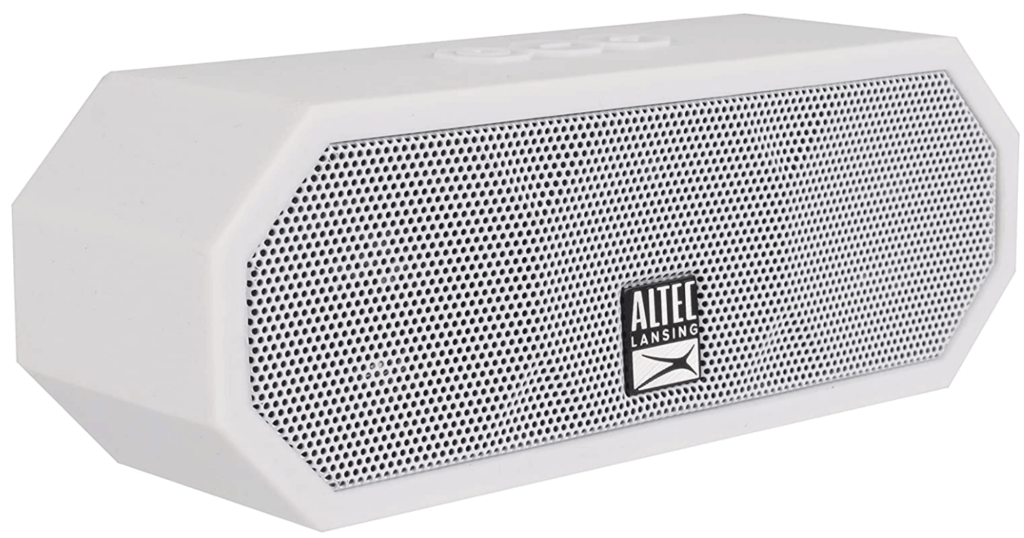
Connecting Altec Lansing speakers properly ensures optimal sound performance for music, movies, and gaming.
Whether you're using wired or wireless models, the setup process can vary slightly depending on the speaker version and your audio source. Most Altec Lansing speakers connect via Bluetooth, AUX cable, or USB, offering versatile options for computers, smartphones, tablets, and TVs.
This guide provides clear, step-by-step instructions to help you pair, sync, and troubleshoot common connection issues. From powering on the speaker correctly to establishing a stable wireless link or secure wired connection, understanding the right method enhances your listening experience and ensures seamless integration with your devices.
 Altec Lansing Computer Speakers How To Connect
How To Connect Altec Lansing Speakers
Connecting Altec Lansing speakers properly ensures high-quality audio performance whether you're using them for music, movies, or gaming.
These speakers come in various models, including wired and wireless (Bluetooth) versions, so the connection process may vary depending on your specific device. Generally, the setup involves pairing via Bluetooth, using an auxiliary (3.5mm) cable, or connecting through USB or RCA inputs. It’s crucial to identify your speaker model and compatible devices to establish a stable connection.
Most Altec Lansing speakers feature intuitive indicators such as LED lights to guide the pairing process, and some include additional functionalities like built-in rechargeable batteries and hands-free calling via integrated microphones. Following the correct steps based on your speaker type will ensure seamless audio streaming with minimal interference.
Connecting Altec Lansing Bluetooth Speakers
To connect an Altec Lansing Bluetooth speaker, first ensure the speaker is fully charged and powered on. Press and hold the Bluetooth or pairing button (usually labeled with a Bluetooth symbol) until the LED starts blinking, indicating it’s in pairing mode.
 Amplifier How To Connect Speakers To TV
On your audio source device—such as a smartphone, tablet, or laptop—navigate to the Bluetooth settings and turn Bluetooth on. Search for available devices, then select your Altec Lansing speaker from the list. Once connected, the LED will typically turn solid blue or white, and you’ll hear a confirmation tone. If the connection fails, try forgetting the device on your source and repeat the process.
Some models support passive pairing, meaning they will automatically reconnect to the last paired device when powered on. Always refer to the user manual for model-specific instructions and troubleshoot using reset options when needed.
Using a 3.5mm Aux Cable for Wired Connection
For users who prefer a stable, lag-free wired connection, using a 3.5mm auxiliary (aux) cable is a reliable method to connect Altec Lansing speakers. Start by locating the audio output jack (usually labeled “Audio Out” or “Headphone Jack”) on your device—such as a laptop, TV, or MP3 player—and plug one end of the aux cable into it.
Then, insert the other end into the aux input port on your Altec Lansing speaker. Power on the speaker and switch the input mode to “AUX” using the mode or source button, if applicable. Adjust the volume on both the source device and the speaker for optimal sound.
 AmpMe How To Connect Multiple Speakers
This method eliminates potential wireless interference and is ideal for stationary setups where mobility isn't required. Ensure you use a high-quality shielded cable to prevent humming or static noises during playback.
Charging and Powering Your Altec Lansing Speaker
Before attempting any connection, it’s essential to ensure your Altec Lansing speaker is sufficiently powered. Most portable models are powered by built-in rechargeable lithium-ion batteries and come with a USB charging cable (often micro-USB or USB-C).
Connect the cable to a power source such as a wall adapter, computer, or power bank, and plug it into the speaker’s charging port. Charging times vary by model but typically range from 2 to 5 hours. A charging indicator LED will illuminate (often red while charging, turning green or blue when fully charged).
Never operate the speaker while it’s critically low on battery, as this can affect audio quality and Bluetooth stability. For non-portable Altec Lansing speaker systems, ensure they are plugged into a working power outlet using the provided AC adapter. Proper charging ensures reliable performance and extends the speaker’s lifespan.
 How To Connect 2 JBL Speakers To One Phone
| Connection Method | Required Equipment | Best For |
|---|---|---|
| Bluetooth Wireless | Smartphone, tablet, or PC with Bluetooth | Wireless convenience and mobility |
| 3.5mm Aux Cable | Aux cable, device with headphone jack | Stable, low-latency audio connection |
| USB Connection | USB cable, computer or charger | Direct audio and charging (on select models) |
| RCA Input | RCA cables, AV receiver or TV | Home theater or older audio systems |
Step-by-Step Guide to Connecting Altec Lansing Speakers
Why won't my Bluetooth detect my Altec Lansing speaker?

Check Bluetooth Compatibility and Pairing Mode
One of the most common reasons your device won’t detect your Altec Lansing speaker is that it isn’t in proper pairing mode or there’s a compatibility issue.
Altec Lansing speakers need to be manually placed into discoverable Bluetooth mode before they can be detected by other devices. Typically, this involves pressing and holding the Bluetooth or power button until an indicator light starts flashing, signaling pairing mode.
Ensure your speaker is powered on and not already connected to another device, as some models won’t appear in pairing mode if they’re actively connected. Also, verify that both your source device and the speaker support compatible Bluetooth versions, as mismatches can prevent detection.
 How To Connect 2 LG XBoom Speakers
- Press and hold the Bluetooth button on your Altec Lansing speaker until the LED blinks blue or blue and red, indicating pairing mode.
- Confirm that the speaker is not already paired and connected to another device, as it may remain invisible to new connections while connected.
- Check the Bluetooth version of your device and ensure it's compatible with your speaker model—for example, older Bluetooth 2.1 devices may struggle to pair with newer speaker firmware.
Reset and Re-pair the Bluetooth Connection
Sometimes, accumulated pairing data or a software glitch can prevent your device from recognizing the Altec Lansing speaker. Resetting the Bluetooth connection can clear corrupted or outdated pairing information and refresh the communication channel between devices.
This process may involve forgetting the speaker in your device's Bluetooth settings, restarting both devices, and resetting the speaker itself. Resetting the speaker often clears all paired devices, forcing it back to factory default settings, which increases the chances of successful detection during a new pairing attempt.
- On your phone, tablet, or computer, go to Bluetooth settings and select Forget or Remove the Altec Lansing speaker from the paired devices list.
- Power off the Altec Lansing speaker, then press and hold the volume down and Bluetooth buttons (or as specified in your model’s manual) for about 10 seconds to perform a factory reset.
- Turn the speaker back on, place it in pairing mode again, and search for it from your device’s Bluetooth menu to establish a fresh connection.
Address Interference and Signal Range Issues
Even if your Altec Lansing speaker is in pairing mode, wireless interference or being out of range can prevent it from being detected. Bluetooth signals operate within a limited range, usually up to 30 feet (10 meters), and physical obstructions like walls or metal objects can significantly weaken the signal.
Additionally, other wireless devices such as Wi-Fi routers, microwaves, or cordless phones operating on the 2.4 GHz band can interfere with Bluetooth connectivity. Ensuring a clear line of sight and minimizing the number of active wireless devices nearby can improve detection success.
 How To Connect 2Boom Speakers
- Place your speaker within close proximity (within 3–6 feet) of your Bluetooth device, with no large obstacles between them, especially metal or thick walls.
- Turn off or move away other wireless devices that might operate on similar frequencies to reduce signal interference.
- Avoid using the speaker near appliances like microwaves or strong Wi-Fi routers, and consider switching your Wi-Fi to a 5 GHz band if possible to reduce congestion on the 2.4 GHz spectrum.
Frequently Asked Questions
How do I connect my Altec Lansing speakers via Bluetooth?
To connect your Altec Lansing speakers via Bluetooth, power on the speaker and press the Bluetooth button to enter pairing mode. Enable Bluetooth on your device, then select your Altec Lansing speaker from the list of available devices. Once connected, you’ll hear a confirmation tone. Ensure the speaker is within 30 feet of your device for optimal performance and consult your model’s manual if pairing fails.
Can I connect Altec Lansing speakers using an AUX cable?
Yes, you can connect Altec Lansing speakers using a 3.5mm AUX cable. Plug one end into the audio output of your device and the other into the AUX input on the speaker. Power on the speaker and switch to AUX mode using the mode button if available. Adjust the volume on both devices for the best sound. This wired connection provides a stable audio stream without relying on Bluetooth.
What should I do if my Altec Lansing speaker won’t connect to Bluetooth?
If your Altec Lansing speaker won’t connect, first ensure it’s in pairing mode—usually indicated by a flashing Bluetooth light. Restart both the speaker and your device. Remove the speaker from your device’s Bluetooth list and re-pair. Check for interference or distance issues. If the problem persists, reset the speaker by holding the power button for 10 seconds, then try again.
Do Altec Lansing speakers support connecting to multiple devices at once?
Most Altec Lansing speakers do not support simultaneous connections to multiple devices. You can pair the speaker with several devices, but only one can be actively connected at a time. To switch devices, disconnect the current one via Bluetooth settings and connect the new one. Some newer models may offer multipoint Bluetooth, but this feature is not standard across all Altec Lansing speaker series.
 How To Connect A Receiver To Speakers
Leave a Reply