
Best Speaker Configuration For Valorant

Choosing the best speaker configuration for Valorant can significantly enhance your competitive edge by delivering precise audio cues and immersive soundscapes.
As a tactical first-person shooter, Valorant relies heavily on accurate positional audio to detect enemy movements, ultimates, and ability usage. Ideal setups include 2.1 or 5.1 surround systems that provide clear directional sound without distortion.
Proper speaker placement, room acoustics, and audio calibration further optimize performance. While headphones remain popular among pros, high-quality speakers offer a spacious experience for casual and competitive players alike. This guide explores top speaker configurations tailored for Valorant’s audio demands.
 Speaker Configuration Valorant
Best Speaker Configuration For Valorant: Optimizing Your Audio Setup for Competitive Edge
Achieving the best speaker configuration for Valorant is essential for players who want to maximize situational awareness, detect enemy footsteps, and communicate effectively during intense tactical gameplay.
Unlike music or movies, competitive gaming requires precise audio imaging, minimal latency, and clarity across a wide sound spectrum—especially in the mid and high frequencies where gunshots, abilities, and footsteps are most distinguishable.
The ideal setup involves positioning your speakers correctly, choosing high-quality audio hardware, and adjusting in-game and system audio settings to complement your physical environment. Whether you're using stereo, 5.1 surround, or even virtualized spatial audio through stereo speakers, aligning your audio configuration with Valorant's sound design gives you a decisive edge in identifying enemy movement and ability usage before they become a threat.
Optimal Speaker Placement for Competitive Gaming
Proper speaker placement is critical when configuring your audio setup for Valorant. Ideally, your left and right front speakers should form an equilateral triangle with your head, placed at ear level and angled directly toward your listening position.
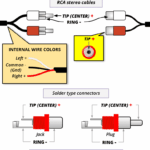 Speaker Wire Configuration
This stereo setup ensures accurate soundstage imaging, allowing you to determine the direction of footsteps, reloads, and ability cues with precision. If using a 5.1 or 7.1 surround system, position the surround speakers slightly behind and to the sides of your head, avoiding too wide an angle that could distort rear audio localization.
Additionally, keep your speakers away from walls and corners to minimize sound reflections and bass buildup, ensuring that low-frequency booms from ultimates like Omen's From the Shadows remain impactful without muddying directional cues.
Choosing the Right Speakers for Valorant's Audio Design
Not all speakers are created equal, especially when it comes to competitive gaming like Valorant. It's important to select monitors or speakers with a flat frequency response and low distortion, so that subtle audio cues aren't masked or overemphasized.
Models designed for studio monitoring, such as popular bookshelf audio monitors, are excellent choices because they prioritize audio accuracy over exaggerated bass or treble, which is common in consumer-grade multimedia speakers.
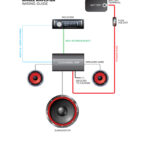 Speaker Wiring Configurations
Look for speakers with wide sweet spots and strong midrange clarity, as most in-game sounds—like footsteps, weapon swaps, and ability casts—reside in those frequencies. Additionally, ensure your speakers are paired with a high-quality amplifier or audio interface to reduce audio latency, giving you real-time sonic feedback critical for split-second reactions in Valorant.
In-Game and System Audio Settings to Enhance Directional Awareness
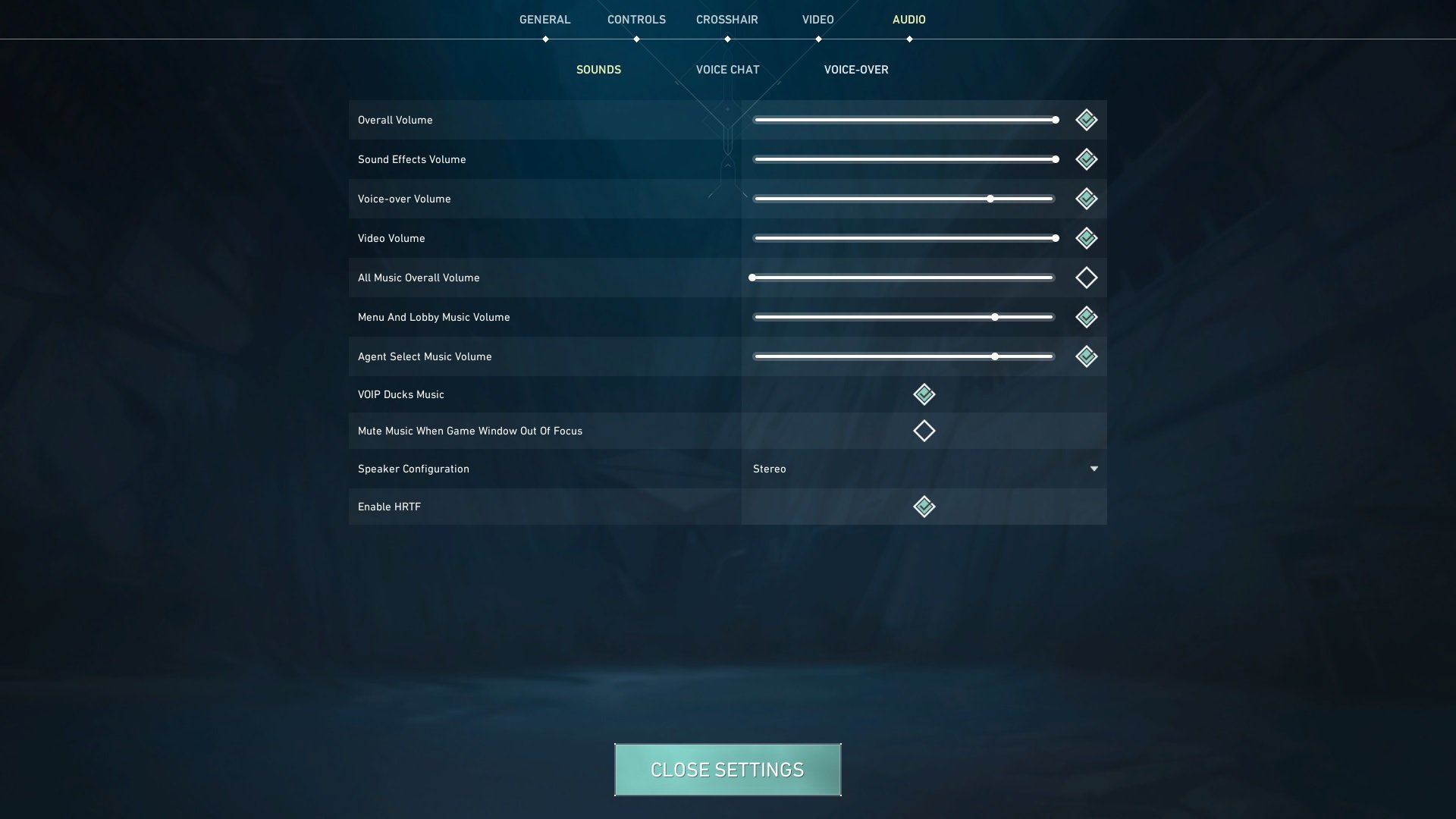
Even with excellent hardware, poor software configuration can undermine your competitive advantage. In Valorant, navigate to the audio settings and ensure that spatial audio is properly enabled or simulated if using stereo speakers.
While Valorant currently lacks native support for surround sound through speakers, using Windows' spatial sound control panel (like Windows Sonic or Dolby Atmos for Headphones) can sometimes enhance depth perception, though results vary.
For speaker setups, it's generally recommended to use stereo output with no virtual surround processing to avoid artificial reverb or echo that can distort positional cues. Adjust the in-game mix so that SFX and Voice Chat are balanced—ideally 70% SFX, 30% music, and full clarity on teammate callouts—to hear both enemy movement and strategic communication clearly.
 TF2 Speaker Configuration
| Feature | Recommended Setting | Reason |
|---|---|---|
| Speaker Type | Studio Monitors (e.g., KRK, Yamaha HS) | Offers accurate sound reproduction and flat response ideal for detecting subtle in-game cues. |
| Configuration | Stereo (2.0) or 5.1 (if properly calibrated) | Stereo provides best phase coherence; 5.1 useful only with precise speaker placement. |
| Audio Output | Exclusive Mode Enabled (Windows) | Reduces audio latency and prevents interference from other apps. |
| In-Game SFX Mix | 70–80% | Maximizes clarity of footsteps and gunshots without overpowering voice chat. |
| Spatial Audio | Off (for speakers), On (if using virtual surround via certified software) | Some virtual processors add unnecessary reverb; pure stereo often delivers better directionality. |
Best Speaker Setup for Optimal Valorant Gameplay Experience
What is the optimal speaker setup for competitive play in Valorant?
Why Directional Audio Accuracy Matters in Valorant
- Precise directional audio is critical in Valorant because the game relies heavily on sound cues such as footsteps, ability effects, and gunshots to inform player decisions. Knowing the exact direction an enemy is moving from allows for better positioning, holds, and reactions.
- Unlike visual indicators, audio cues in Valorant are often the first and sometimes only warning of an approaching threat. Therefore, the ability to distinguish subtle differences in sound placement—especially between left, right, front, and behind—can directly impact survivability and engagement outcomes.
- A high-quality speaker setup enhances the real-time spatial separation of sounds, which helps players identify layered audio information—for example, differentiating between a Reyna using Leer versus a Skye throwing a smoke from the opposite side of a site.
Recommended Speaker Configuration for Competitive Advantage
- A stereo (2.0) speaker setup placed at ear level, equidistant from the listener in a symmetric A/B configuration, is widely considered optimal for competitive Valorant play. This setup ensures balanced sound imaging and minimizes phase interference.
- Speakers should be positioned at a 60-degree angle relative to the listener, forming an equilateral triangle between the two speakers and the head position. This setup supports accurate stereo panning and sound staging, crucial for detecting lateral movements.
- Using studio monitors—such as the Audioengine A2+, PreSonus Eris E3.5, or JBL 305P MkII—can significantly improve clarity and transient response over consumer-grade multimedia speakers, providing cleaner audio for pinpointing in-game sounds.
Environmental and Calibration Considerations
- A room with minimal echo and controlled reflections—achieved through acoustic treatment like foam panels or fabric-covered furniture—helps preserve sound fidelity and prevents muddiness that could obscure directional cues.
- Calibrating speaker volume, balance, and equalization settings to match both hardware and in-game audio preferences ensures that subtle audio details like ability cooldowns or hatch opening sounds are neither overpowered nor drowned out.
- Disabling sound-enhancing software such as spatial audio, virtual surround, or bass boost is recommended, as these can introduce latency or distort the game’s native stereo field, ultimately harming competitive performance.
What Is the Optimal Speaker Setup for Competitive Valorant Play?

Speaker Placement for Accurate Sound Imaging
Proper speaker placement is crucial for achieving precise sound imaging in competitive Valorant, where understanding the direction and distance of in-game audio cues like footsteps, gunshots, and ability activation can determine match outcomes.
To optimize audio clarity and spatial accuracy, speakers should be positioned at ear level and angled directly toward the listener, forming an equilateral triangle between the two speakers and the listener’s head. This stereophonic setup ensures balanced stereo imaging and minimizes phase cancellation or sound distortion. Additionally, placing speakers away from walls and reflective surfaces reduces unwanted reverberations, which could otherwise mask subtle audio signals critical during gameplay.
 Valorant Speaker Configuration
- Position both left and right speakers at a 60-degree angle relative to the listener’s central position for optimal stereo separation.
- Elevate speakers if necessary using stands or monitor risers to align the tweeters with your ear level when seated.
- Ensure at least 1–2 feet of space between each speaker and nearby walls to reduce bass buildup and echo interference.
Choosing Between Bookshelf vs. Floor-Standing Speakers
For competitive Valorant play, bookshelf speakers are generally the preferred choice over floor-standing models due to their compact size, tighter soundstage, and improved near-field listening performance. Since most gamers sit relatively close to their audio source, bookshelf speakers provide more direct sound projection with minimal dispersion, enabling faster auditory reaction times.
Floor-standing speakers, while powerful and full-range, are designed for larger rooms and far-field listening, which can result in delayed or diffused audio cues when used in small, close-proximity setups. Gamers prioritizing audio precision should also consider speakers with balanced frequency response and low bass resonance to prevent muddying mid and high frequencies where critical game sounds reside.
- Select bookshelf speakers with a flat frequency response profile, ideally ranging from 50 Hz to 20 kHz, to capture both low rumbles and high-pitched environmental cues clearly.
- Avoid overly bass-heavy models, as excessive low-end can obscure quieter sounds like reloading or crouching footsteps.
- Consider passive bookshelf speakers paired with a high-quality amplifier or active (powered) models with built-in amplification tailored for desktop audio performance.
Integration of Subwoofers and Surround Sound Considerations
While a subwoofer can enhance immersion by reproducing deep sounds such as ability effects or explosion impacts, it is not essential for competitive advantage in Valorant and can even degrade performance if not properly calibrated.
Low-frequency effects (LFE) often contribute little to directional audio decision-making, and an unbalanced subwoofer may mask high-frequency details critical for detecting enemy movement.
 Valorant Speaker Configuration Mono Or Stereo
Similarly, while 5.1 or 7.1 surround sound systems offer expanded audio field perception, stereo setups remain superior for competitive scenarios due to their simplicity, tighter imaging, and fewer phase alignment issues. If using a subwoofer, it should be set to supplement—not dominate—the lower end, with crossover frequencies typically set around 80 Hz to blend seamlessly with the main speakers.
- Disable or reduce subwoofer output during competitive matches to prevent auditory masking of high-frequency positional cues.
- If using a surround sound system, configure the audio output in stereo mode within Windows and Valorant settings to preserve consistent soundstage precision.
- Use acoustic treatment like foam panels or diffusers to minimize reflections that could distort surround or stereo imaging, especially in untreated rooms.
Is Mono Audio More Effective Than Stereo for Competitive Valorant Play?
Audio Positional Accuracy in Competitive Gameplay
- Positional audio is critical in fast-paced shooters like Valorant, where hearing the direction and distance of enemy footsteps, gunshots, and ability cues can determine match outcomes. Stereo audio uses two distinct channels—left and right—to create a sense of directionality, allowing players to precisely locate sounds based on volume and timing differences between ears.
- High-quality stereo setups, especially when using stereo headphones, provide a wide soundstage. This gives players a nuanced perception of sound origin, which is particularly effective when distinguishing whether an opponent is approaching from the left flank, right corner, or advancing down a narrow hallway.
- Many professional Valorant players rely on stereo audio because modern game engines, including the one powering Valorant, are optimized for stereo spatialization. Features such as HRTF (Head-Related Transfer Function) enhance depth and front-back differentiation, making stereo setups highly effective for perceiving three-dimensional audio cues in a two-channel format.
Advantages of Mono Audio for Hearing Clarity
- Mono audio combines all sound channels into a single output, meaning the same audio signal is delivered identically to both ears. This can be advantageous for players with hearing imbalances or those using hearing aids, as it ensures no directional information is lost due to asymmetrical auditory perception.
- In certain situations, mono audio can improve the clarity of critical sounds by eliminating panning effects. For players who struggle to distinguish subtle directional cues in stereo, having all sounds centered and equally loud on both sides may make it easier to detect faint footsteps or reload sounds without straining to interpret spatial positioning.
- Some players report that mono audio reduces audio fatigue during long gaming sessions, especially in loud environments where external noise interferes with stereo imaging. By simplifying the soundscape to a unified channel, the brain may process auditory information with less cognitive load, potentially increasing awareness over extended periods.
Configuring Audio Settings for Optimal Performance in Valorant
- Valve’s Source engine, adapted for Valorant, emphasizes accurate spatial audio through stereo rendering. The game does not natively support surround sound simulation or force mono output, meaning players must manually adjust OS or driver settings if they wish to use mono. This can be done through accessibility options in Windows or via third-party audio software.
- Players using mono audio should consider using high-sensitivity headphones that provide a flat frequency response to avoid muffled or distorted sound. Clarity in mid and high frequencies is especially important for detecting footsteps and gunshot direction, even in a mono environment.
- Ultimately, personal preference and hardware play a significant role. Competitive players are encouraged to experiment with both stereo and mono setups in custom games or practice modes to determine which configuration enhances their ability to track enemies and react faster. Factors such as headphone type, room acoustics, and individual auditory perception influence effectiveness more than the audio format alone.
Frequently Asked Questions
What is the best speaker setup for competitive play in Valorant?
A 2.1 or 5.1 surround sound speaker system is ideal for competitive Valorant play. These setups provide accurate directional audio, helping you detect enemy footsteps, ability cues, and gunfire direction. Position front speakers at ear level and angled toward your position. A subwoofer enhances low-frequency effects without overpowering game audio. Calibrate speaker levels properly to maintain audio balance and ensure precise spatial awareness during matches.
Should I use stereo or surround sound speakers for Valorant?
Surround sound speakers, especially 5.1 systems, are generally better for Valorant than stereo. They offer improved positional audio, making it easier to detect enemies moving behind or beside you. However, a high-quality stereo setup can still perform well with proper speaker placement and audio calibration. Surround sound gives a tactical edge, but stereo is sufficient if properly optimized and preferred for simpler setups or smaller rooms.
How important is audio calibration for Valorant speaker configuration?
Audio calibration is essential for an optimal Valorant speaker setup. Proper calibration ensures balanced volume levels and accurate sound positioning, critical for detecting subtle in-game cues like footsteps or ability activations. Use your sound card or system settings to adjust speaker distance, volume, and delay. Well-calibrated audio improves spatial awareness, giving you a competitive advantage by ensuring sounds are realistically represented in your gaming environment.
 What Is Speaker Configuration
Can high-end speakers improve my performance in Valorant?
High-end speakers can improve Valorant performance by delivering clearer, more precise audio. Better drivers and sound staging allow you to distinguish between similar sounds, like different abilities or gunfire types, with greater accuracy. While skill and settings matter most, premium speakers enhance situational awareness. However, even mid-range speakers with good positioning and calibration can provide excellent competitive advantage in Valorant’s audio-dependent environment.
Leave a Reply