
Pyle Speakers How To Connect
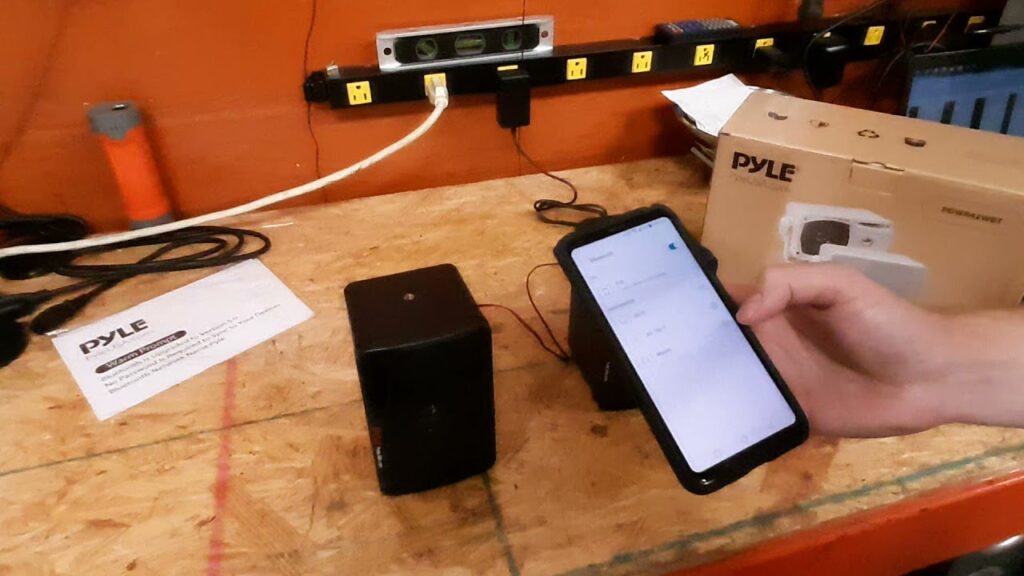
Connecting Pyle speakers properly ensures optimal audio performance for your home or mobile setup. Whether you're using wired or wireless models, understanding the correct connection methods is essential for seamless integration with audio sources like smartphones, TVs, or amplifiers.
This guide walks you through step-by-step procedures to connect various Pyle speaker types, including Bluetooth pairing, auxiliary inputs, and direct wiring options.
You'll also find tips on troubleshooting common connectivity issues and maximizing sound quality. With clear instructions and practical advice, setting up your Pyle speakers becomes a straightforward process, enhancing your listening experience across different environments and devices.
 How To Connect Bluetooth To Multiple Speakers
How to Connect Pyle Speakers: A Step-by-Step Guide
Connecting Pyle speakers properly ensures optimal sound quality and seamless integration with your audio devices. Whether you're setting up speakers for home entertainment, outdoor use, or portable sound systems, understanding the correct connection methods is essential.
Pyle offers a wide range of speakers—from wired to Bluetooth-enabled models—each requiring specific setup steps. This guide walks you through the necessary procedures, compatible devices, and best practices to help you get your Pyle speakers connected efficiently and safely, regardless of the model or audio source you're using.
Wired Connection Methods for Pyle Speakers
To establish a wired connection with Pyle speakers, start by identifying the input type on both the speaker and the audio source—commonly RCA, 3.5mm auxiliary, or terminal (spring clip or binding post) connections.
Use the correct cables, such as speaker wire for terminal connections or an aux cable for RCA or 3.5mm inputs. Ensure the amplifier or receiver is powered off before connecting the wires to prevent damage.
 How To Connect Ceiling Speakers To Amplifier
Match the positive (+) and negative (-) terminals correctly between the amplifier and the speaker to maintain proper audio polarity, which affects sound quality and speaker performance. Once connected, power on the system and adjust the volume gradually to test the output.
Connecting Pyle Bluetooth Speakers Wirelessly
For Bluetooth-enabled Pyle speakers, the setup process is straightforward. Begin by powering on the speaker and placing it in pairing mode—typically done by pressing and holding the Bluetooth or source button until the LED blinks blue or red.
On your device (smartphone, tablet, or computer), navigate to the Bluetooth settings and scan for available devices. Select the Pyle speaker from the list (its model number may appear, such as “Pyle PLBT” or similar).
Once paired, you’ll usually hear a confirmation tone. Ensure your device stays within the recommended range (usually up to 33 feet or 10 meters, without obstacles) for uninterrupted playback and optimal audio performance.
 How To Connect Edifier Speakers To Audio Technica Turntable
Connecting Pyle Speakers to TVs, Amplifiers, and Audio Devices
Pyle speakers can be integrated with a variety of audio systems like TVs, amplifiers, and AV receivers. For passive Pyle speakers, use compatible audio amplifiers and connect via speaker wire to the terminal outputs.
For active (powered) models, use RCA or 3.5mm cables to link the audio output of the TV or receiver to the speaker's input. If using a home theater receiver, ensure the impedance and power rating of the Pyle speakers match the receiver's specifications to avoid damage.
Some models support multiple input types, allowing flexible connectivity. Always consult the user manual for model-specific guidance and connection diagrams to ensure compatibility and optimal setup.
| Connection Type | Required Cables/Accessories | Best For |
|---|---|---|
| Wired (Terminal) | Speaker wire, amplifier | Home audio systems, outdoor setups |
| Auxiliary (3.5mm/RCA) | 3.5mm audio cable, RCA cable | Connecting to TVs, smartphones, desktops |
| Bluetooth | None (wireless) | Portable use, mobile devices, quick setups |
How to Connect Pyle Speakers: A Step-by-Step Guide
How to Find the Pairing Code for a Pyle Bluetooth Speaker

 How To Connect Edifier Speakers To PC Wired
Understanding the Pairing Code Concept for Pyle Bluetooth Speakers
- Unlike many modern Bluetooth devices, most Pyle Bluetooth speakers do not use a traditional pairing code or PIN during the connection process. Instead, they enter pairing mode automatically and become discoverable to nearby Bluetooth-enabled devices such as smartphones, tablets, or laptops.
- The absence of a pairing code simplifies the user experience, allowing for quick and seamless connections. When the speaker is in pairing mode, you simply select it from the Bluetooth device list on your phone or other device, and the pairing occurs without requiring manual input of a code.
- In cases where a PIN is required by your device’s operating system, default codes such as 0000 (four zeros) or 1234 are commonly accepted by Bluetooth accessories. While Pyle does not typically publish specific pairing codes, these universal defaults often work if prompted during pairing.
How to Enter Pairing Mode on a Pyle Bluetooth Speaker
- Power on the Pyle Bluetooth speaker using the designated power button, usually indicated by a |> or similar icon. The LED indicator will typically flash red and blue or blink alternately in two colors to signal that the device is ready to pair.
- Press and hold the Bluetooth or Source button on the speaker for 3–5 seconds until you hear an audible voice prompt saying something like “Bluetooth pairing” or see a blinking indicator light. This confirms the speaker is now in discoverable mode.
- On your mobile device or tablet, go to Settings > Bluetooth, turn on Bluetooth if it isn't already, and wait for the device to scan. Look for a device named “Pyle” followed by a model number (e.g., Pyle PBT275) and tap it to initiate the connection. No code entry is usually needed unless your device prompts for one.
Troubleshooting Pairing Issues with a Pyle Bluetooth Speaker
- If your device fails to pair or asks repeatedly for a code, first ensure the speaker is in pairing mode. If the lights are solid or not flashing in an alternating pattern, restart the speaker and try entering pairing mode again by holding the Bluetooth button.
- Clear any previous Bluetooth connections by going to your device's Bluetooth settings, selecting the Pyle speaker if it appears, and choosing “Forget This Device.” Then restart both the speaker and your phone or tablet and repeat the pairing process.
- If prompted for a PIN, enter 0000 or 1234, as these are generic codes used by many Bluetooth devices when a specific passcode is not assigned. Also, ensure the speaker is within close range (within 30 feet with minimal obstructions) to maintain a strong Bluetooth signal during setup.
Frequently Asked Questions
How do I connect Pyle speakers to my phone via Bluetooth?
To connect Pyle speakers to your phone via Bluetooth, power on the speaker and enable Bluetooth on your phone. Place the speaker in pairing mode (usually indicated by flashing lights). Select the speaker’s name from your phone’s Bluetooth device list. Once connected, you can play audio directly from your phone. Ensure both devices are close and within range for stable connection.
Can I connect Pyle speakers using an AUX cable?
Yes, you can connect Pyle speakers using a 3.5mm AUX cable. Plug one end into your audio source’s headphone jack and the other into the AUX input on the speaker. Turn on the speaker and select the appropriate input mode, usually labeled “AUX.” Adjust volume on both the speaker and the device for best sound quality. This method works with phones, tablets, laptops, and other audio devices.
How do I connect Pyle speakers to a TV?
To connect Pyle speakers to a TV, use an AUX cable or RCA cables, depending on your TV’s audio output and the speaker’s input options. Plug the cable from the TV’s audio output into the corresponding input on the speaker. Switch the speaker to the correct input mode. Adjust TV audio settings to route sound through external speakers. Test volume and sound clarity once connected.
Do Pyle speakers support Wi-Fi connection?
Most Pyle speakers do not support Wi-Fi connectivity. They typically use Bluetooth, AUX, USB, or FM radio for audio input. Check your specific model’s manual to confirm available connection options. If Wi-Fi is required, consider using a streaming device or adapter that connects via AUX or Bluetooth. Pyle focuses on portable and affordable audio solutions rather than smart Wi-Fi integration in most models.
 How To Connect Harbinger Speakers Bluetooth
Leave a Reply